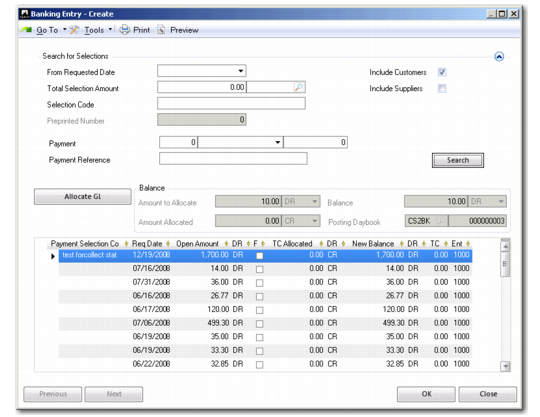
Allocate to Payment Selection
The Allocate to Payment Selection option lets you allocate the entry amounts to a customer or supplier payment selection. Use the search criteria to retrieve the required selections.
Banking Entry, Allocate to Payment Selection
Field Descriptions
Search for Selections
Use the following search criteria for finding payment selections:
From Requested Date
Specify a base date. The system retrieves all selections created after this date.
Total Selection Amount
Specify a selection amount and currency.
Selection Code
Use this field to retrieve selections by payment number, payment instrument, and internal payment number.
Payment Reference
Enter a payment reference number; for example, a specific check number. This applies to AR check numbers only.
Selection Code
Enter the code that identifies a payment selection.
Preprinted Number
Enter a preprinted number to select a payment payment selection that contains that number. This field is available for supplier selections only.
Include Customers/Suppliers
Select to include customer selections, supplier selections, or both. By default, the Customers field is selected for banking entries to record movements into the account, and the Suppliers field for movements out of the account.
Click Search to apply the criteria and retrieve the required selections.
Allocate GL
Click to allocate this entry amount to a GL account. If the entry amount is not completely allocated to a selection, the remaining non-allocated amount can be balanced in a posting on the GL level. See
Allocate to GL Account.
The following fields are displayed in the Balance frame:
Amount to Allocate
This field displays the amount to be allocated to this selection. This amount defaults from the statement line.
Allocated Amount
This field displays the amount allocated when you have chosen a selection.
Balance
This field displays the difference between the amount to allocate and the selection amount.
Posting Daybook and Number
These fields display the daybook type and number for this entry posting.
By default, the selections in the grid are not allocated. Right-click to view the detailed list of items in the selection (which are grouped by business relation). You can clear the Allocated field in the grid for items against which you do not want to allocate. For example, you normally select only those items that are being paid at this time.