Reference Details
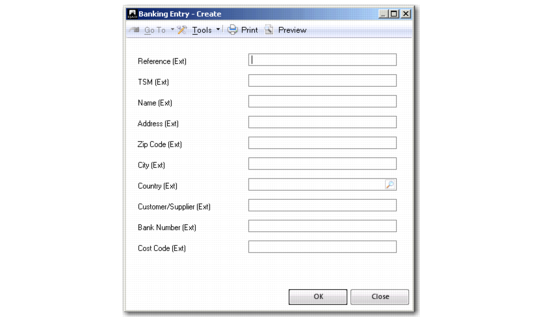
Right-click a bank entry line and select the Reference Details option to display a screen in which you can enter additional allocation information for the line. This option is to record information provided to you by your bank. These details are stored by the system but not validated. The (Ext) suffix on field names denotes external information.
Reference Details
Field Descriptions
Reference (Ext)
Specify the payment reference.
TSM (Ext)
Transfer with Structured Message. If a customer invoice is issued with a unique payment reference string, the bank refers to that reference and you can specify the structured payment reference in this field.
Name (Ext)
Specify the name of the destination or originating party.
Address (Ext)
Specify the address of the destination or originating party.
Zip Code (Ext)
Specify the zip or postal code of the destination or originating party.
City (Ext)
Specify the city of the destination or originating party.
Country (Ext)
Specify the destination or originating country.
Customer/Supplier (Ext)
Specify the customer or supplier code.
Bank Number (Ext)
Specify the bank number of the other party.
Cost Code (Ext)
Specify a code representing cost information.