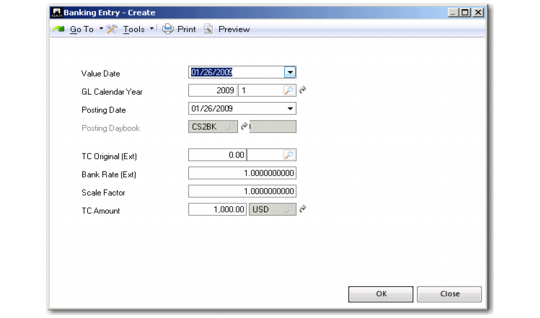
Value Details
You can also enter additional information on value dates and “external” exchange rates provided by your bank by selecting the Value Details option. These details are used in the calculation of realized gains and losses when the bank account has a different currency than the customer or supplier payment. Right-click the entry line to display the option.
Value Details
Field Descriptions
Value Date
This field displays the date on which the money will be available in the bank account.
GL Calendar Year
This field defaults from the statement header.
Posting Date
This field defaults from the statement header.
Posting Daybook
This field displays the daybook of the statement line in focus.
TC Original (Ext)
This field displays the amount that the business relation paid to the bank and the currency of the payment. (This is not the original open item currency amount.)
Bank Rate (Ext)
This field displays the exchange rate that the bank uses to convert this amount to the bank account currency in which the payment was made.
Scale Factor
This field defaults from the grid.
TC Amount
This field defaults from the grid.
You can view the value details of an existing banking entry by right-clicking the line in the banking grid and selecting the Value Details option.