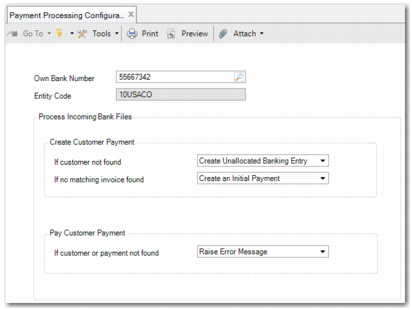
Payment Processing Configuration Maint
Using Payment Processing Configuration Maint (31.1.13), you can define how Process Incoming Bank Files (31.1.6) is to process bank files containing the action types:
• Create customer payment
• Pay customer payment
Example: By default, when the action is to create a customer payment and no invoice can be matched, the system creates an initial customer payment by default. However, using Payment Processing Configuration Maint, you can configure the system to create an initial customer payment, a prepayment, or an unallocated banking entry. You can allocate the payment manually later.
Payment Processing Configuration Maint
Own Bank Number
Enter the bank account number involved in the transactions you want to configure. Any settings you configure apply only to this bank account.
Entity Code
This field is read only. It defaults based on the value in the Own Bank Number field.
The Create Customer Payment section contains the following fields:
If customer not found
When the customer is not found by the system, you can specify what action the system is to take by selecting Raise Error Message or Create Unallocated Banking Entry.
If no matching invoice found
When no matching invoice is found by the system, you can specify system behavior by choosing Create a Prepayment, Create an Initial Payment, or Create Unallocated Banking Entry. If you choose to create a prepayment and no customer invoice is matched, the system creates a prepayment for the total payment amount. If only some of invoices can be matched, the system creates a normal customer payment, including a prepayment open item for the remaining amount.
The Pay Customer Payment section contains the following field:
If customer or payment not found
When the customer or payment is not found by the system, you can choose Raise Error Message or Create Unallocated Banking Entry.