Server Output Processing
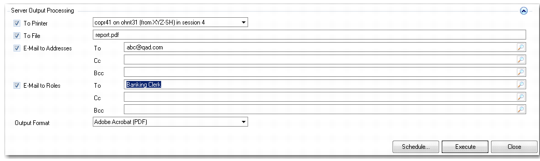
The Server Output Processing area of reports lets you define output options for server-based reports. Use these options to:
• Designate a server printer on which to output the report. The system retrieves a list of all available server printers.
• Specify a file name, location, and format in which to save the report. For example, you can save a report as PDF to a specified location.
• Browse for user e-mail addresses and roles to which to e-mail the report.
You can combine these options by saving a report in file format, selecting users and roles to which to send the file, and e-mailing the file.
Server Output Processing
Field Descriptions
To Printer
Specify a server printer on which to send the report. The drop-down list displays all printers configured on the report server.
To File
Specify a file name and extension when you want to e-mail the report as a file to system users.
Mail Subject
Enter a mail subject header for when the report is emailed to users. The name of the report is entered by default.
E-mail Addresses
Specify system user e-mail addresses to which to send the report file.
E-mail to Roles
Optionally, specify system roles to which to e-mail the report file.
Output To File
Select a file format in which to save the report file.