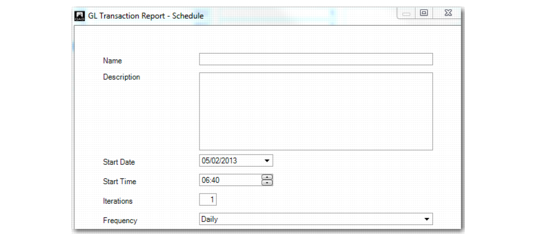
Report Schedule
The Schedule option lets you schedule reports to generate in batches, and specify iterations of each batch.
Scheduled reports are sent to a server queue and are printed in sequence, using a dedicated Report daemon. A .NET Report Service manages and monitors the Report daemon. The service can be installed on the application server or as a remote host.
Report Schedule
Field Descriptions
Name
Enter a name for the report, to a maximum of 80 characters.
Description
Enter a brief description for the report
Start Date
Enter a start date for report processing. The report will be processed on this date.
Start Time
Enter a start time for report processing
Iterations
Specify the number of iterations for the report. This value determines the number of times the report is printed.
Frequency
Select the frequency with which the iterations are run. The options are:
Daily
Weekly
Monthly
Yearly
The report daemon and .NET report service are described in see
QAD System Administration User Guide.