Bank Account Numbers
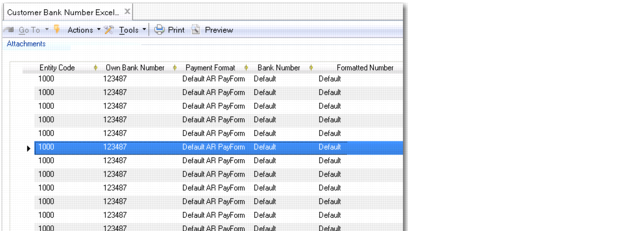
You can use Customer Bank Number Excel Integration (27.20.1.8) and Supplier Bank Number Excel Integration (28.20.1.7) to load bank numbers and modify existing bank number records. You can also export the data to Excel for update or review.
Note: This same function is available for suppliers; the description here applies to both customers and suppliers.
You can use the Load Bank Numbers option in the right-click menu in the grid to load all existing customer bank numbers. You can then make mass updates to all the customer bank numbers; for example, changing the own bank number of a cross-section of customers. The Existing Record field in the grid lets you determine whether the bank number record you modified updates an existing record or creates a new bank number record.
For a description of how to import data from Excel, see
Introduction to QAD Enterprise Applications User Guide.
Customer Bank Number Excel Integration
Field Descriptions
Bank Account Number
Specify the bank account number.
Formatted Number
This field displays the formatted bank account number. See
Define Bank Account Formats.
Active
Indicate if this is an active record.
Default
Specify the default bank account number.
Extension
Specify the bank extension number.
Validation
Indicate if the account number must be validated.
SWIFT Code
Specify the SWIFT code.
Type
Specify the parent type: Customer, Supplier, or GL.
Branch
Specify the branch associated with the bank.
Parent Object Code
Specify a customer, supplier, or GL code.
Business Relation Code
Specify the bank business relation code.
Curr
Specify the currency code of the bank account.
Entity Code
Indicate for which entity the bank number can be used.
Own Bank Number
Specify the number of your bank to be associated with this customer or supplier bank.
Payment Format
Specify the code set up in Payment Format Maintain associated with your bank account number.
Payment Instrument
Specify the payment instrument associated with the payment format associated with your bank account.
Referenced
This field indicates if the account is already referenced within the system.
Existing Record
This field lets you control how the system treats existing bank number records modified using Bank Number Excel Integration. When using Bank Number Excel Integration, the combination of customer code, bank number, own bank number, and payment format uniquely identifies a record.
If you modify an existing bank number record in the grid and leave the Existing Record field selected, the system tries to locate a unique bank number record to update that has the same key identifier values as the record you modified in the grid. If the system locates a single matching record, it saves your change as a modification to the existing record. If the system cannot find a matching record to update, an error message displays.
If you modify an existing bank number record in the grid and deselect the Existing Record field, the system saves your change as a new bank number record.
When you load existing bank number records from the database, the Existing Record field is automatically selected for bank numbers that have never been used in a payment and is deselected for bank numbers that have been used in payments. If a bank number is used in a payment, you can no longer update the bank number record.
Important: Before using combinations of own bank numbers and payment formats in Excel integration, you must define them first in Bank Payment Format Link.
Bank Account Format
Specify the code set up in Bank Account Format Create for validating this bank account number.
Last Modified Date/Time and User
These read-only fields display the ID of the user who last updated this record and the date and time of update.
Example:
Open Customer Bank Number Excel Integration. You right-click in the grid and select Load Customer Bank Numbers to load all customer bank numbers in the database into the grid.
You select a record with the following details:
• Customer Code: APEX
• Bank Number: 320-8998278-84
• Own Bank Number: 110-7897237-66
• Payment Format: Check
In the Customer Bank Number Excel Integration grid, you change the own bank number of the record to 230-5897239-68 and select the Existing Record field. You click the Save button and the system updates the existing bank number record.