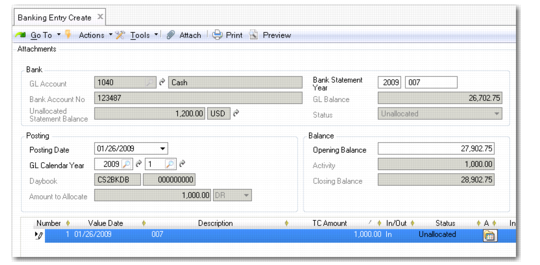
Banking Entry Create Function
Use Banking Entry Create (31.1.1) to create statements and lines, and, optionally, complete the allocation to accounts, customer or supplier open items, payments, and payment selections.
Banking Entry Create
Field Descriptions
GL Account
Specify the bank GL account, which must be of type Bank Account.
Bank Statement Year
This field indicates the current GL calendar year and the number of this statement. The statement number increments from the statements previously created, and you can modify this number. The sequence of statements does not have to be consecutive. This allows you to distribute the statement entry workload over multiple users.
Bank Account No.
The system displays the bank account number that corresponds to the bank GL account. This read-only field is automatically populated using the GL account definition.
GL Balance
This field displays the current balance for this account.
Unallocated Statement Balance
This field displays the total amount of all statements that have been created for the bank account, but have not yet been posted. This field combines with the GL balance to provide a preview of the GL balance after all statements are allocated. This amount is the actual balance of the bank account.
Status
This read-only field indicates the statement status: Not Allocated, Partially Allocated, or Allocated.
The following fields display in the Posting frame:
Posting Date
This field defaults to the current date. The posting date must be within the limits of the GL period specified.
Note: You cannot allocate a banking entry to a payment if the posting date of the payment is later than the posting date of the banking entry.
GL Calendar Year
This field indicates the GL calendar year/GL period in which the banking entry postings are created.
Daybook/Number
This field indicates the posting daybook linked to the bank GL account. It must be an internal daybook of type Banking Entries. The consecutive posting numbering sequence is generated by the system for each line allocation (read-only field).
Amount to Allocate
This field indicates the amount to allocate in this banking entry, as a credit or debit. This amount corresponds to the amount you enter in the grid.
The following fields display in the Balance frame:
Opening Balance
This field indicates the opening balance of the bank account, as it appears on the statement.
Activity
This field displays the total of the transaction currency amounts for all statement lines in this entry.
Closing Balance
This field displays the Closing Balance for the account when the movements have been added to or subtracted from the Opening Balance.
Enter the statement line information in the grid.
Number
This field displays the system-generated sequence number for the line, which you can modify.
Value Date
Specify the bank date of the transaction. This field defaults to the system date for the first line and to the value date of the previous line for all subsequent lines, but can be modified.
Description
Enter a brief description (maximum 40 characters) of the transaction.
TC Amount
Enter the movement amount in transaction currency.
In/Out
Select In or Out for payments into or out of the account. Payments in correspond to customer payments, and payments out to supplier payments.
Status
This field indicates the status of the transaction. By default, the transaction is unallocated.
Allocate
Click the icon to select an allocation method.
Allocate to Invoice: Use this method to allocate this movement to an open invoice. The system displays Bank Entry Allocate, in which you search for invoices, allocate to a GL account, allocate to a payment selection, or create a prepayment.
Allocate to Payment Selection: This option displays the payment selection search screen.
Allocate to Payment: This option displays a customer and supplier payment lookup.
Allocate to GL Account: This option displays Journal Entry Create, in which you select a GL account to which you allocate the movement.
Information
Enter additional information about the entry.
Scale Factor
This field indicates the scaling factor applying to the transaction currency, if any.
Last Modified User/Date and Time
These read-only fields display the ID of the user who last updated this record and the date and time of update.