Customer Type
Use the Customer Type activities (27.20.4) to create, modify, view and delete codes for grouping customers. You can use customer type to select groups of customers for reporting, in particular for sales analysis reports. Customer types are system-wide data and apply to all domains and entities.
You can also define GL sales accounts by customer type, channel, product line, and site in Sales Account Maintenance (1.2.17). This lets you separately track sales and cost of sales amounts for different types of customers.
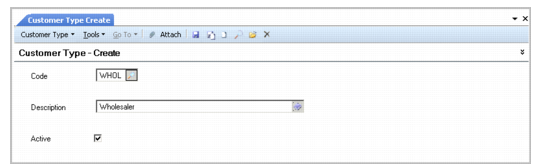
Customer Type Create
Field Descriptions
Type
Enter a code (maximum four characters) that identifies a customer type. This field is mandatory; the code cannot be blank.
Description
Enter a brief description (maximum 40 characters) of the customer type. This field is mandatory; the description cannot be blank.
You can optionally enter descriptions in more than one language. For more information on the Translation Option, see
Introduction to QAD Enterprise Applications User Guide.
Active
Indicate if this is an active record.