EDI Advanced Banking for Accounts Receivable
Financials EDI Advanced Banking supports business cases where your bank acts as an intermediary to collect cash from customers. In these cases, the supplier notifies the bank of the invoice or staged payment details (including the amount, due date, and early or late payment conditions) shortly after the invoice is issued to the customer. The bank then starts a process in which a document is issued to notify the customer that the invoice or staged payment must be paid through the bank. An example of EDI Advanced Banking is Boleto Bancários, which is a significant payment collection system in Brazil.
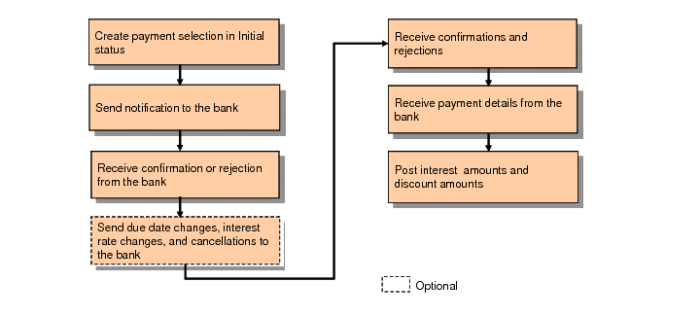
To start the EDI Advanced Banking flow for Accounts Receivable, you (the supplier) select open customer invoices and staged payments, and create a payment selection at status Initial. The payment selection status is set to Initial because you are creating a payment order to your bank to collect a specified amount at a future date, and no GL entries or updates to AR open balances are required at this time.
If required, you can modify the unexecuted Initial payment selection to update due dates or interest rates, or to remove lines.
You then execute the payment selection. EDI eCommerce then sends the resultant file to the bank to notify it of payments to collect. The bank then notifies you regarding whether it accepts or rejects the payment requests.
If you need to cancel invoices from the executed payment selection or change due dates or the interest rate, you can modify the Initial payment selection to cancel or update lines. During this process, you must move the canceled or updated lines to an unexecuted Initial payment selection, and execute the payment selection to inform the bank of the changes.
When the bank notifies you that it has received payment from your customers, the system creates a new payment with the status For Collection or Paid, and updates AR open balances. The system also posts discounts allowed for early payment and posts interest received if the customers do not pay by the due date.
EDI Advanced Banking, AR Flow
Each step in the EDI Advanced Banking flow for Accounts Receivable is described in detail in the following sections.