GL Allocation Batch Run
By default, the system runs all selected lines in the GL Allocation Batch Run Execute screen, except when a batch has already run for the same target period. The system also keeps a log file of previously run allocations.
An allocation batch is run correctly if the figures it uses from the Budget module are valid. These figures are calculated by the Budget daemon. The system checks for unprocessed daemon records before running each allocation in the batch, and displays a warning when unprocessed records exist.
When an allocation batch is interrupted, you can restart the batch for the same GL period. All allocations already run are deselected to ensure that they are not re-run.
The result of an allocation is immediately posted. By using a transient layer daybook as target—the recommended approach—you can review the allocation postings, and correct or delete them as necessary. You then assign them to the official or management layer.
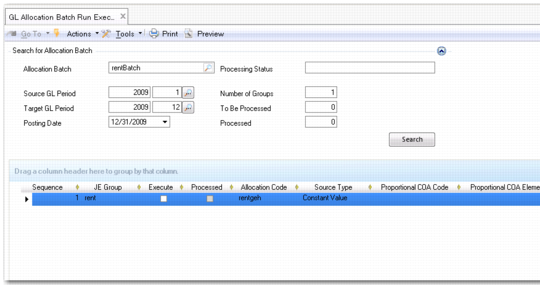
Allocation Batch Run Execute
Field Descriptions
Allocation Batch
Specify the allocation batch to run.
Processing Status
This field displays the status the current allocation batch.
Source GL Period
Select the source data from this period only or cumulative data from the start of the GL calendar year up to the end of this period.
Target GL Period, Posting Date
Specify the target period and posting date.
Number Of Groups
Specify the number of JE groups selected for execution.
To Be Processed
This field displays the number of JE groups still to process.
Processed
This field displays the number of JE groups already processed.
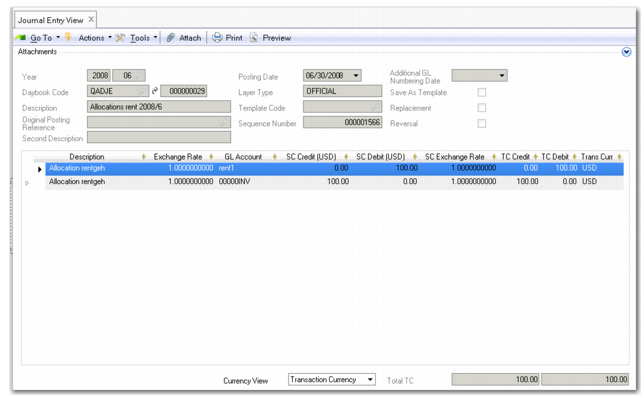
Click Search to display the allocation batch details in the grid. When you have executed the allocation batch run, use Journal Entry View to view the resulting posting.
Allocation Batch Journal Entry