Language
A base set of language codes is supplied with the system. These language codes correspond to the codes used with UI translation files provided by QAD. System-defined languages cannot be changed or deleted.
Languages are used in multiple places in the system:
• A default database language is defined in System Maintain (36.24.3.1). This language provides a default for printed reports when translated strings cannot be found in the language associated with a customer or supplier. This language is used as the default language for displaying translatable strings for system-level operational data.
• Languages are associated with business relations. Each address associated with a business relation can have its own language. The language associated with the specific address type—headoffice, ship‑to, end user—is used to select comments in the appropriate language in operational functions, such as sales, purchasing, and service/support.
• Languages are associated with users and determine the language for displaying menus, labels, messages, and other user interface elements.
Before defining business relations, you can define additional language codes if necessary. However, since languages are used to select the appropriate translated strings to display on the user interface and in reports, generally it is not a good practice to create new languages. The ones supplied with the system are associated with translated data strings, and if you define new languages, appropriate translations cannot be found.
Translation Option
Many data setup functions provide a language translation option for description fields. For example, when you define an account, you typically use a cryptic, possibly numeric code and specify a description that indicates the account’s use; for example, Account: 001SOVA, Description: Sales Order Variance Account.
Since accounts belong to the accounts shared set and can be used in multiple domains, you may have users with different languages that need to see these descriptions in their own language. You can supply your own translation using the Translation Option associated with the Description field. The correct descriptions are then displayed based on the user’s language.
For more information on the Translation Option, see
Introduction to QAD Enterprise Applications User Guide.
Installed Languages
Loading translated language data sets the Installed field to Yes for a language. Language load can be completed in two ways:
• Execute Load Translations (36.24.4).
• Execute System Synchronize (36.24.3.2) with Languages selected.
Note: The US language is always set to installed, since English data is always supplied.
More details about loading and updating language translations can be found in
QAD System Administration User Guide.
The Installed field is controlled by the system and cannot be set from the user interface. Only installed languages can be associated with a user in User Maintenance (36.3.1). When a user logs in, the system checks the language code associated with the user record and displays UI elements in that language. Requiring the language associated with a user to be installed prevents a user from logging in and not seeing the correct menus and labels.
Using the Language Function
Use the Language activities (36.4.1) to view all records, create new ones, modify user-defined records, or delete user-defined records. System-defined records cannot be deleted.
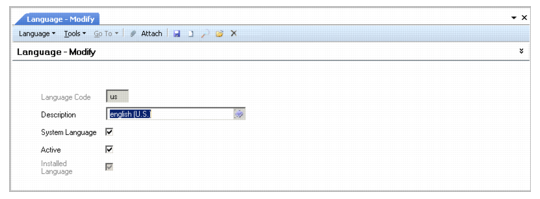
Language Modify
Field Descriptions
Language Code
Enter a code (maximum two characters) that identifies a language. This field is mandatory; the code cannot be blank.
Description
Enter a brief description (maximum 24 characters) of the language code. This field is mandatory; the description cannot be blank.
You can optionally enter descriptions in more than one language. For more information on the Translation Option, see
Introduction to QAD Enterprise Applications User Guide.
System Language
This field indicates if the record is supplied with the system or has been added after installation. You cannot delete system-defined records.
Active
Indicate if this is an active record.
Installed Language
This read-only field indicates translated labels for this language have been loaded and are available in the system. This field is set either by executing Load Translations (36.24.4) or System Synchronize (36.24.3.2). Only installed languages can be associated with users in User Maintenance (36.3.1)
For details on language loading and system synchronize, see
QAD System Administration User Guide.