Mass Layer Transfer
Mass Layer Transfer Execute (25.13.11) lets you transfer batches of postings from the transient layer to the management or official layers. Unfinalized transactions are generally posted to a daybook in a transient layer for review or for simulation purposes. If these transactions are subsequently approved, you can transfer them in batch to the other layers using Mass Layer Transfer Execute. See
Accounting Layers for more information.
When transferring, the target daybook must have the same GL type as the original transient daybook. If you do not specify a source daybook, all postings in the source daybook that have the same GL type as the target daybook and meet the other selection criteria are selected for transfer.
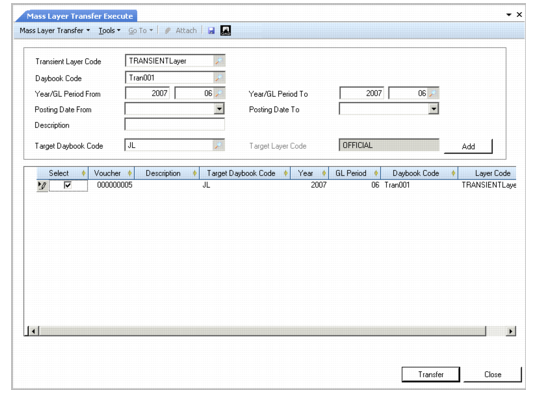
When you click the Add button, the system populates the grid in the Mass Layer Transfer screen with postings that match the selection criteria. From this list, you can choose which postings to include in the transfer by selecting or clearing the Select field for that posting.
All selected postings are transferred to the same target daybook, which can be linked to the official layer, a management layer, or another transient layer. However, the target daybook must be different from any of the source daybooks. The postings are transferred from the source daybook in blocks to ensure that they appear sequentially in the target daybook.
The following types of postings cannot be transferred using Mass Layer Transfer:
• Journal entries for posting templates or recurring entries
• Journal entries that have a different GL type than the target daybook
Example: A US parent entity has a French subsidiary. In France, the accounts are compiled to conform with French GAAP standards. However, the French accounts must also conform to the GAAP standards of the parent entity, which is US GAAP.
The subsidiary creates a transient layer for French accounts. It then reviews the accounts for errors, removes invalid transactions, and posts correction or adjustment transactions to make the French accounts apply to US GAAP.
The subsidiary then uses Mass Layer Transfer to move the postings to a specific management layer for final consolidation.
Important: You can only use Mass Layer Transfer Execute (25.13.11) to transfer regular, non-periodic costing postings. To transfer periodic costing postings, use Mass Layer PC-Transfer Execute (25.13.12).
Mass Layer Transfer
Field Descriptions
Transient Layer Code
Specify the layer code that identifies the transient layer to transfer postings from.
Daybook Code
Specify the daybook in the transient layer from which to transfer postings.
If daybook security is implemented and you specify a Journal Entries daybook with Financial or External daybook control, you must be assigned the role associated with the daybook you select. Otherwise, an error is displayed and you cannot save the mass layer transfer transactions. See
Daybook Security.
Year/GL Period From
Specify the GL calendar year and the first GL period from which postings are to be transferred. This field is mandatory.
Year/GL Period To
Specify the GL calendar year and the last GL period from which postings are to be transferred. This field is mandatory.
Posting Date From
Specify the first date in a range to search for postings to transfer.
Posting Date To
Specify the last posting date in the range to search for postings to transfer.
Description
Enter a brief description (maximum 40 characters) of the postings to be transferred.
Target Daybook Code
Select the daybook to which to transfer the postings. The target daybook must be of the same GL type as the source daybook.
If daybook security is implemented and you specify a Journal Entries daybook with Financial or External daybook control, you must be assigned the role associated with the daybook you select. Otherwise, an error is displayed and you cannot save the mass layer transfer transactions. See
Daybook Security.
Target Layer Code
This field displays the layer associated with the daybook to which to transfer the postings.
Click Add to retrieve journal entries that match the criteria.
Grid Field Definitions
Select
Select the field to indicate the transactions you want to transfer.
Clear the field for transactions that you want to remain in the transient layer.
Voucher
This field displays the numeric identifier assigned to the posting. When the daybook of the journal entry is changed (after transfer), the voucher is cleared.
Description
This field displays a description of the posting line.
Daybook Code
This field displays a code that identifies the daybook in the transient layer to which the transaction is currently posted.
Target Daybook Code
This field displays the target daybook for the transaction transfer.
Layer Code
This field displays the target layer for the transaction transfer.
Year
This field displays the GL calendar year that the system associates with the transferred transactions.
GL Period
This field displays the GL period that the system associates with the transferred transactions.
Click Transfer to begin the transfer of your selected postings to the target layer.
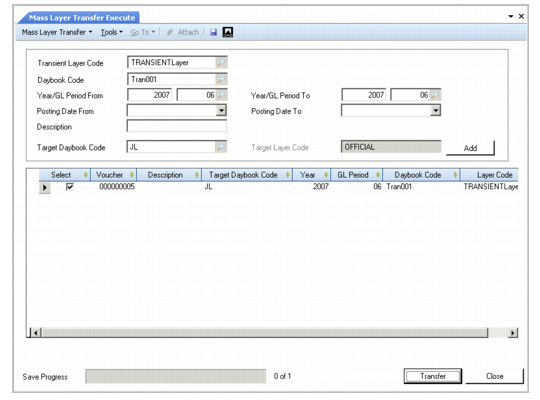
Note: A progress indicator shows the status of the transfer. Once started, you cannot cancel the transfer.
Mass Layer Transfer Progress Indicator