Maintain Test Specification Collection
The Maintain Test Specification collection provides supporting data for all your test specifications as well as maintenance functions, so that you can browse for data required for you to set up without running other programs.
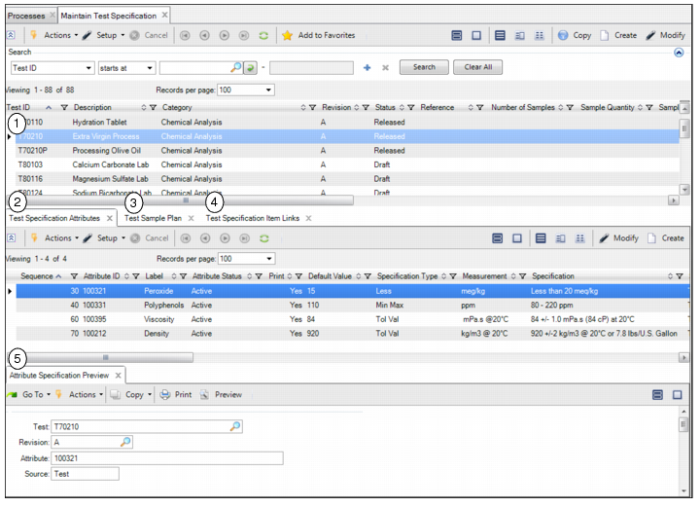
The following graphic shows you the Maintain Test Specification browse collection, including the supporting browse collection frames and buttons.
Maintain Test Specification Collection
The Maintain Test Specification collection consists of the following browses and tabs:
1 Test Specification browse. Displays a list of all test specifications. Double-click the test specification to view detailed information, such as test ID, revision, status, and release date. In the browse, you can view, copy, or add new test specifications. To add a test specification, see
Creating a Test Specification.
2 Test Specification Attributes tab. Displays the attributes associated with the test specification. In this tab, you can view, modify, or add new attributes to the test specification. To add attributes to a test specification, see
Adding Attributes to an Item Profile.
3 Test Sample Plan tab. Displays the test sample plan, which is a set of parameters that describe how the sample lot is tested, associated with the test specification. In this tab, you can view, modify, or create test sample plans. See
Creating a Test Sample Plan.
4 Test Specification Item Links tab. Displays the items that are associated with this test specification. In this tab, you can modify the test specification and item link or link more items to the test specification. See
Maintaining Test Specification and Item Links.
5 Attribute Specification Preview tab. Allows you to verify that the test specification has been set up correctly. This tab functions the same as the Attribute Specification Preview tab on an item profile. For more information, see
Verify Item Attribute Setup.