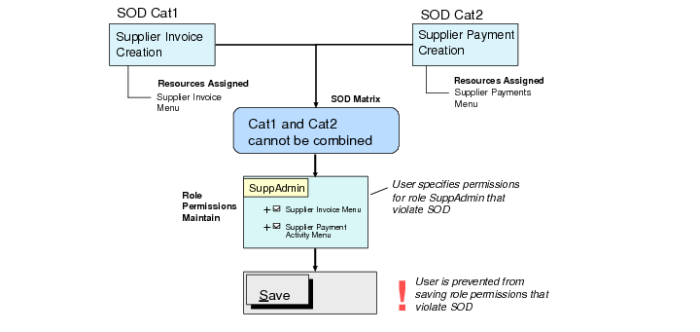
Segregation of Duties Rule Checking
Role Permissions Validation
When you add a resource to the list of resources allowed for a role in Role Permissions Maintain (36.3.6.5), the system validates the assignment to verify that all the role resources belong to compatible segregation of duties categories (Rule 1 validation). If Rule 1 is violated, the system blocks the role permissions updates, and returns an error message indicating the cause of the violation.
When you add a resource to the list of resources allowed for a certain role, the system also checks that roles to which a user belongs are associated with compatible segregation of duties categories (Rule 2 validation). If Rule 2 is violated, the system displays a warning and saves the change. However, an entry is created in the segregation of duties log.
Note: When the SOD Block All Rule Violations field is selected in SOD Configuration (36.3.27.14), the system blocks Rule 2 violations in Role Permissions Maintain (36.3.6.5) instead of issuing a warning.
When a resource is removed from the list of resources allowed for a role, the system runs the Rule 1 and Rule 2 validation. The validation is run before and after the deletion to detect if an existing violation has been solved by removing the resource. A new entry is written to the segregation of duties log if the deletion fixes an existing violation.
Role Permissions Validation