Activating Segregation of Duties
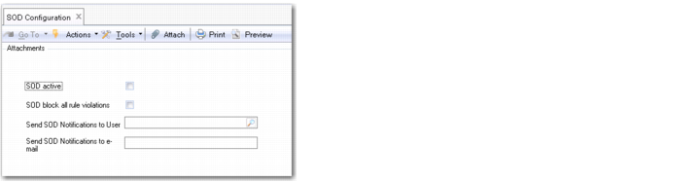
Use SOD Configuration (36.3.27.14) to activate segregation of duties rule checking on your system.
SOD Configuration (36.3.27.14)
SOD Active
Select the field to activate rule checking for segregation of duties.
If you activate segregation of duties, all validation rules are run to check for violations. You cannot continue implementing segregation of duties if role permission (Rule 1) violations exist on your system. You must deactivate segregation of duties, resolve the violations raised, and then reimplement segregation of duties.
When you first begin to implement segregation of duties, it is recommended that you deactivate segregation of duties rule checking, and only activate it again when you have defined all categories, the segregation of duties matrix, linked resources to segregation of duties categories, and defined roles. If you deactivate segregation of duties, the system does not check for role permission and role membership violations, and notification and logging are also disabled.
If you deactivate segregation of duties, all existing violations are deleted, and log entries are created for violations that were rectified.
SOD Block All Rule Violations
Select this field if the system must block any changes to role-based security that would allow users to access conflicting resources. The effect of selecting this field is that all indirect violations become blocked. Direct violations are always blocked, regardless of the setting of the SOD Block All Rule Violations field.
If this field is not selected, administrators are not blocked from providing users with access to functions with conflicting segregation of duties categories. However, any violations are still recorded in the log files.
Important: Users are always blocked from performing actions in Role Permissions Maintain (36.3.6.5) that cause Rule 1 violations and are always blocked from performing actions in Role Membership Maintain (36.3.6.6) that cause Rule 2 violations.
If you select this field, the system prevents administrators from making changes to role-based security that violate role permission (Rule 1) and role membership (Rule 2) segregation of duties rules. If you activate blocking for rule violations, the violations log will always be empty because administrators are actively blocked from performing actions that violate segregation of duties rules.
When you enable this field, the system checks if violations exist, and displays an error if violations are found. The SOD Block All Rule Violations field cannot be enabled until these violations are fixed.
If you leave the field deselected, the system does not block an administrator from making changes to role-based security that violate role permission (Rule 1) and role membership (Rule 2) segregation of duties rules. The violations raised are written to the segregation of duties log.
The default value is deselected.
Send SOD Notifications to User
In addition to on-screen notifications and the segregation of duties audit logs, the system can send notification of segregation of duties violations by e‑mail. The system can send notifications to an external mail address or to the internal inbox of a user on the system.
If you want the system to send segregation of duties notification e-mails to a user, use the lookup to specify the user. The system uses the email address for the user configured in User Maintenance.
Send SOD Notifications to Email
If you want the system to send segregation of duties notification e-mails to an external e-mail address, specify the e-mail address in this field.