SOD Category Excel Integration
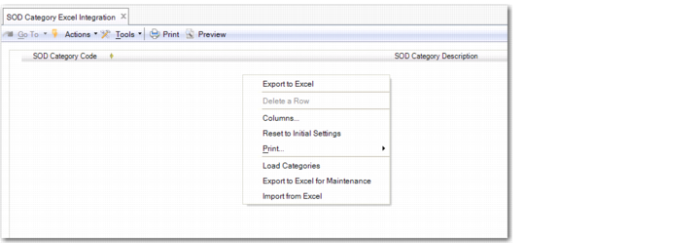
Use SOD Category Excel Integration (36.3.27.1.5) to export segregation of duties category records to or load records from an Excel spreadsheet.
If you right-click and select Load Categories, the system shows all segregation of duties categories in the grid. You can then modify and save the segregation of duties category records.
If you right-click and select Export to Excel for Maintenance, the system downloads the loaded segregation of duties category records, and exports them to an Excel file for maintenance. You must specify the name and location of the exported Excel file. You can also select Export to Excel for Maintenance when the grid is empty. In this case, the system creates an Excel sheet with the relevant database field names headings for maintaining data.
If you right-click and select Import from Excel, you can select and load an Excel file containing segregation of duties category records. The Excel file must be in the correct format for importing and have the correct database field names as column headings.
In the SOD Category worksheet, you can add segregation of duties categories by inserting a new row and reloading the file. When modifying existing segregation of duties category data, you can change the category description only.
SOD Category Excel Integration (36.3.27.1.5)