Assigning Resources to Segregation of Duties Categories
Use SOD Category Membership Maintain (36.3.27.4) to maintain associations between an application resource—that is, an activity or a program represented by a menu item—and a segregation of duties category.
First, define segregation of duties categories in SOD Category Create (36.3.27.1.1) and specify the category compatibilities in SOD Matrix Maintain (36.3.27.3).
You select resources to assign to categories using a tree view similar to that in Role Permissions Maintain (36.3.6.5). The tree view shows the resources that are available on the menu and the hierarchical structure of the menu, and then shows the resources that are not available on the menu.
An application resource can be associated with only one category or with no category.
• If associated with a category, the resource is only compatible with other resources that are associated with resources with the same segregation of duties category, with resources that have a compatible segregation of duties category, and with all resources that are not linked to a segregation of duties category.
• If associated with no category, the resource is compatible with any other application resource, regardless of the segregation of duties category to which those resources are attached.
Example: You associate Supplier Invoice Create with the segregation of duties category code SuppInvCr, and Supplier Payments Create with the segregation of duties category code SuppPayCr.
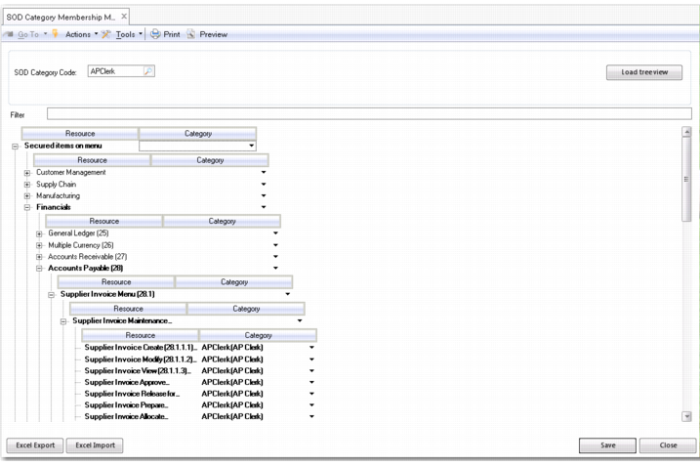
You select a category by typing the category code, or using the lookup. The Load Tree View button shows the resources assigned to the selected category in bold, providing an immediate visual indication of resources and category assignments.
To assign a category to a menu resource, select the category from the drop-down list to the right of the resource name.
SOD Category Membership Maintain (36.3.27.4)
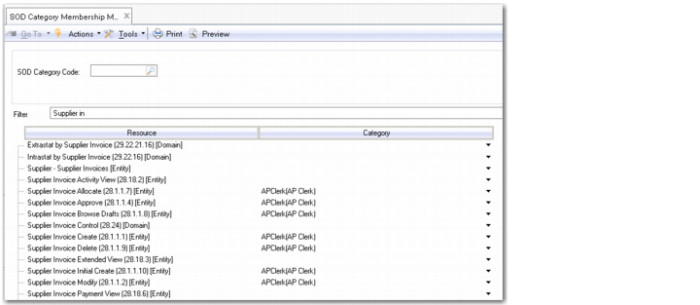
To facilitate the assignment of resources, you can use the Filter field at the top of the screen to search for menu labels, menu item entry numbers, URNs, and segregation of duties categories.
SOD Category Membership Maintain, Filtering
SOD Category Code (header)
Specify a segregation of duties category and click the Load Tree View button to display the menu tree view with menu items assigned that segregation of duties category highlighted in bold.
Filter
Specify values to search for menu labels, menu item entry numbers, URNs, and segregation of duties categories.
Category (grid)
Select a category from the drop-down on a grid row to assign that segregation of duties category to the resource on that row. A resource can only be associated with one category or no categories.