Limiting Access to Fields
Field security prevents unauthorized users from updating secured fields in standard programs. Field security does not prevent users from seeing the value of a field if they have access to the screen where it is updated. Nor does it protect a field from program-level updates through custom code.
Note: Standard field security is not exactly the same as component-based field security. In component-based functions, you can disable and hide fields.
The system determines whether a user is authorized based on whether the user ID matches the values specified for the field.
Field Security Validation
When you install your QAD application, security is not active for any fields, and only a few fields are eligible for field security. Use the Dictionary Field Security Report (36.3.15.4) to determine which fields can be given security.
In the character interface, you also can access the field on a screen and press Ctrl+F. The information window indicates whether password validation is available for the field.
An eligible field must have a specific validation expression in the data dictionary that references gppswd.v. The syntax is:
{gppswd.v &field=<dictionary field name>}
Activated Field Security Report
Use the Activated Field Security Report (36.3.15.3) to see which fields have security activated. It also lists privileged user IDs.
Dictionary Field Security Report
The Dictionary Field Security Report (36.3.15.4) lists the fields containing the association to the validation file as part of their definition.
Protect any of these fields from update by creating a record of privileged user IDs or roles. This association can be made to any field, and is one of the only database definition changes you can make that does not constitute a schema change.
Adding Security to an Eligible Field
1 Add the field name and the list of user IDs that can access the field in Field Security Maintenance (36.3.15.1).
2 Verify that the field is secured by running the Activated Field Security Report (36.3.15.3).
Adding Field Security Eligibility
You can make most fields eligible for field security by adding the validation expression to the field in the data dictionary. You then recompile the programs that use the field, using the modified data dictionary. It is not always possible to add field security. Some fields have preexisting data dictionary validation expressions that prevent the addition of gppswd.v.
Warning Once you have made a field eligible for field security, you cannot make it ineligible. You can deactivate the security by removing all user IDs for the field in Field Security Maintenance (36.3.15.1).
For multiple databases, make your security changes in the database against which you compile. The changes are then in effect for any other databases you run the compiled code against.
1 Identify and list all fields to which you want to add security.
Since recompiles take time, it is more efficient to add all field security at once.
2 Make sure all other users are logged out.
3 Run Field Eligibility Maintenance (mgfldcmt.p, 36.25.22), which changes the validation expression and message in the data dictionary.
4 Set field security for each field on your list.
The mgfldcmt.p utility prompts for a table and field name on which to activate field security. Once you enter a valid field and table name and you press Next, you are prompted for the next entry.
5 Press End to exit Field Eligibility Maintenance.
6 Recompile either all programs or those programs impacted by the changed field security. If you have custom programs that access these fields, they also need to be recompiled.
To compile only the affected programs, make a backup copy of utcompil.wrk in the qad directory, and then delete the program names that you do not want recompiled from the file.
utcompil.wrk contains a complete list of all programs.
7 Back up recompiled code.
8 You can now add the field name and the list of user IDs that can access each field in Field Security Maintenance.
9 Verify that each field is secured by running the Activated Field Security Report.
Field Security by Role
You also can set up field security for all users that are assigned to a specific role.
1 Assign users to roles in Role Membership Maintain (36.3.6.6.1).
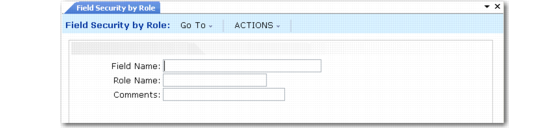
2 Execute Field Security by Role (36.3.15.2). This function adds all users who belong to a specified role or roles to the list of authorized users for a validated field.
Field Security by Role (36.3.15.2)
Even with this process, field security is only available at the user level, not the role level. Field Security by Role is simply a batch utility that lets you add multiple users simultaneously. This has the following consequences:
• If you remove a user from a role that was given access to a field, that user can still access the field. To prevent this, use Field Security Maintenance (36.3.15.1) to remove the individual user.
• You cannot use Field Security by Role to remove multiple users from the list of authorized users. To remove multiple users, you must remove users individually in Field Security Maintenance.
• If you delete a role in Role Delete (36.3.6.4), individual records remain on the system until you delete them in Field Security Maintenance.
Once Field Security by Role is executed for a field and role, all users who belong to the role display in Field Security Maintenance as authorized to access the field. The Comments field in Field Security by Role displays as the comment for the field and user combination in Field Security Maintenance.