Importing Audit Policy
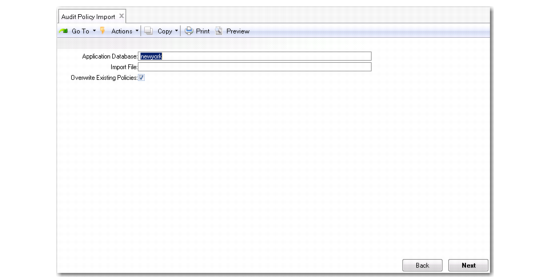
You can import audit policies from Progress policy XML files using Audit Policy Import (36.12.13.1).
Audit Policy Import (36.12.13.1)
Importing audit policies only needs to be done once for each audit-enabled database. The QAD solution will not work without the Progress default policy file loaded.
To import an audit policy file, open Audit Policy Import (36.12.13.1) and complete the following fields:
Application Database
Specify the logical name of the database where the policy will be applied.
Import File
Specify the location of the XML file containing the policy definition. Two files are normally loaded: a Progress policy file that defines general settings and the QAD policy file that defines settings relevant to application tables. The two files are $DLC\auditing\policies.xml (for the default settings of general activities such as login and changing schema, $DLC is the Progress installation directory) and qadmainpolicy.xml (default policy).
The reason you need a default policy (qadmainpolicy.xml) is as follows. When a table is audit enabled, an audit trail is created when a record is changed (an insert, modify, or delete). Important values in the audit trail include the values of identifying fields, which are used to identify the record. These values are displayed in an audit trail report and must be meaningful so that you can recognize a changed record without using database utilities. By default, Progress uses primary keys as identifying fields. If for a given table the primary key is not appropriate for identifying fields, identifying fields for the table need to be set. The default policy provides predefined identifying fields. When you use QAD’s Auditing module, you should load the default policy so that you do not need to define the identifying fields.
The default policy only covers tables whose identifying fields are different from primary keys. For most non-Financials tables, the primary keys can be used as identifying fields, so these tables do not appear in the default policy. For most Financials tables, however, the table has a primary key, which is a sequence identifier, and one or two unique indexes. One unique index is used for the identifying fields. Therefore, a Financials table and its identifying fields are included in the default policy.
Overwrite Existing Policies
Select Yes to replace current policies.