Enabling Auditing on Selected Tables
Use Audit Configuration Maintenance (36.12.13.5) to enable auditing on selected tables.
Audit Configuration Maintenance (36.12.13.5)
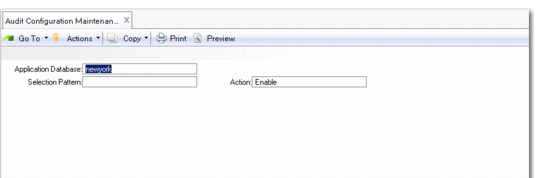
To enable auditing on selected tables, first set the following fields:
Application Database
Specify the database name.
Selection Pattern
Leave this field blank to list all tables or enter a combination of letters and the asterisk symbol (*) as a wildcard to find tables based on matching. For example, to list only the tables whose names start with ab, enter ab*.
Action
Enter the code that represents the action you want to perform on selected tables:
Enable. Audit records will be created for selected tables.
Disable. Audit records will no longer be created for selected tables.
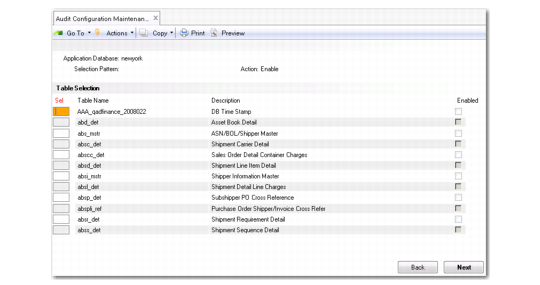
Click Next and the system lists all the tables that meet the selection pattern.
Audit Configuration Maintenance Table Selection
Use the up and down arrow keys to scroll through the list of tables. Use the space bar to select the tables whose Enabled settings you want to change. An asterisk symbol (*) displays at the front of the row of each table you select. To toggle the Enabled settings, select individual tables using the space bar and then press F1. The system asks whether you want to enable the selected tables. Enter Yes (or No) and then press the Enter key.