Setting Archive Database Connection
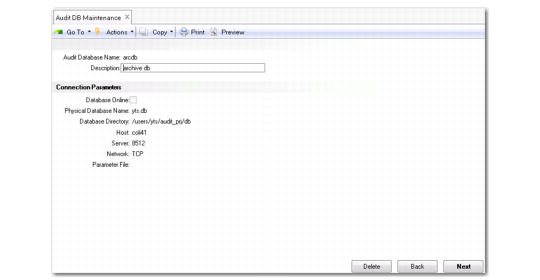
Use Audit DB Maintenance (36.12.13.11) to create and maintain connection parameters for the archive databases.
Audit DB Maintenance (36.12.13.11)
These connection parameters are used by Audit Trail Report–Arc DB (36.12.2).
This program is similar to Database Connection Maintenance (36.6.1), but has some important differences:
• You do not specify a logical name for the connection. The logical name is managed internally by the system.
• Connections to the archive databases are not permanent. The audit reports use the connection information to connect to the archive databases as needed. These processes do not maintain a connection to an archive database after they have retrieved the information they are handling.
• The system can connect to multiple archive databases simultaneously.
Important: Archive databases must be configured and started up in multi-user mode before connecting to them using the connection parameters. Audit DB Maintenance does not start or stop archive databases. It only stores the connection parameters used to connect to them. You must set up external procedures to start up and shut down archive databases as needed.
Database connection parameters are defined by the way archive databases are implemented. The system administrator who creates and maintains the database provides the connection information required to set up the field values on this screen.
In the first frame, enter a name for this archive database connection record. The name must be 8 or fewer characters. It is used for tracking and maintaining your database connection information. It does not necessarily have to be the physical name given to the archive database.
Database Online
This field indicates whether the system should attempt to connect to the archive database. It does not indicate that an archive database is running, or that a connection to the database has been tested or is currently active.
Physical Database Name
Enter the actual physical name of the Progress database. Database names are typically case sensitive and can be up to 12 characters long. The database directory and physical name together make up the complete path name to this database. These are used on the database connect statement when connecting to this database.
Database Directory
Enter the complete path name of the operating system directory where this database is stored. Path names may be case sensitive and can be up to 50 characters long.
Host
Enter the name of the host server where the Progress database can be found. This name follows the -H parameter on the Progress connect statement. It is only required when the database is located on a different computer.
Server
Enter the name of the service to be used by the broker process when starting up the remote database. This name follows the -S parameter in the Progress connect statement. It is only required when the database is not located on the current machine.
Network
Enter the type of network being used. Valid values are TCP (default) and SNA (Progress/400). If left blank, TCP is assumed. This value follows the -N parameter on the Progress connect statement.
Parameter File
Specify the parameter file name. You must specify the connection parameters either in the parameter file or in the corresponding Host, Server, and Network fields. (Do not specify them in both.) If you use the parameter file:
• The file must be accessible through the PROPATH or located in the directory specified in Database Directory.
• You must still specify the database name in Audit DB Maintenance (36.12.13.11). If the database is not located in the PROPATH, you must specify the full path in Database Directory.
• The file must not include the -ld or -db parameters.
• The file must include the -trig parameter, which specifies the location of trigger files.