Auditing
>
Generating Audit Trail Reports
Generating Audit Trail Reports
You can generate reports against application databases and against archive databases.
Generating Reports Against Application Databases
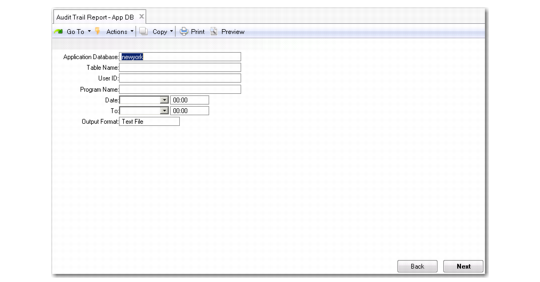
You can generate auditing reports against the application databases using Audit Trail Report–App DB (36.12.1).
Audit Trail Report–App DB (36.12.1)
To generate audit reports, specify the following:
Application Database
Select one of the connected databases. If the database selected is not enabled for auditing, the system displays an error message.
Table Name
Specify a table, or leave this field blank to specify all tables.
User ID
Specify a user ID, or leave this field blank to specify all users.
Program Name
Specify the name of the program that changed the records. For example, specify sosomt.p (Sales Order Maintenance) to get audit trail data generated for changes made by Sales Order Maintenance.
Date, To
Specify the beginning and ending dates.
Summary/Detail
Select summary mode or detail mode. In summary mode, no field value changes are reported.
Output Format
Specify the output format as a text file (.txt) or XML file (.xml).
Click Next. If just one table was selected, then the system displays the identifying fields and allows the user to specify a range of values for one or more fields to narrow the search results. This frame displays the field name and the field label for each identifying field of the selected database table. You can specify from and to values in the data range frame.
Audit Trail Report–App DB Field Selection
Click Next again to have the system retrieve the records according to the criteria you have specified and generate a report (or output file).
The report shows the Table Name, User ID, Date, Time, and Program for each audit trail record that meets the criteria.