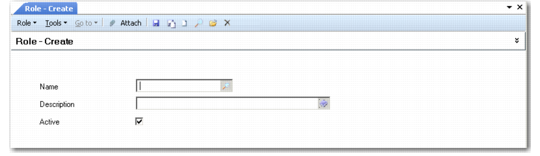
Defining Roles
Use Role Create (36.3.6.1) to define roles in your system. You should define as many roles as required in order to model your business processes in the system. Use Role Modify (36.3.6.2) to perform maintenance on existing roles defined in your system, and Role View (36.3.6.3) to view roles.
A role defined in the system can be deleted using Role Delete (36.3.6.4) as long as the role is not referenced in the system.
Role Create (36.3.6.1)
Name
Enter a name (maximum 20 characters) identifying a role. Names are restricted to the characters A–Z, a–z, and 0–9.
Note: Superuser is an existing role and cannot be used as a name. This role is used during initial system setup and has access to all system functions.
Description
Enter a description (maximum 40 characters) of the role. You can optionally enter descriptions in more than one language. For more information on the Translation Option, see
Introduction to QAD Enterprise Applications User Guide.
Both the role name and description display in the lookup associated with role fields and on various reports and inquiries, as space permits.
Active
Indicate if this is an active record.
Although deactivated roles can still display within browses, a deactivated role cannot be selected from other system functions. If a role is deactivated, existing security records defined within the system that use the role are still valid and remain functional. However, no new security records that reference the deactivated role can be created—new role memberships or role permissions, for example.