QAD 2016 Enterprise Edition Training Guides
>
Financials-Advanced
>
Logistics Accounting
>
General Setup
General Setup
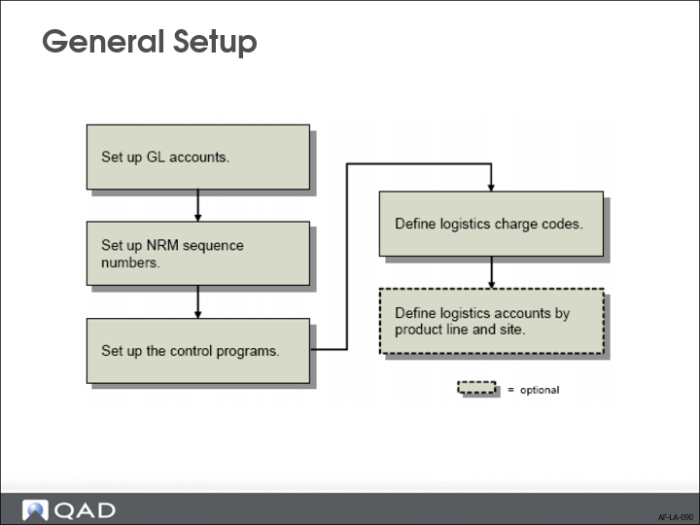
To implement Logistics Accounting, you first need to define general data, such specific GL accounts, Number Range Management (NRM) sequence numbers, control programs settings, logistics charge codes, and, optionally, logistics accounts by product line and site. Next, you set up inbound and outbound specific data, like freight charges and cost elements.
This section details the general setup steps for Logistics Accounting.
Note: This course does not provide detailed information on how taxes for logistics charges are set up and calculated. For more details, see
QAD Master Data User Guide.
Setting Up GL Accounts
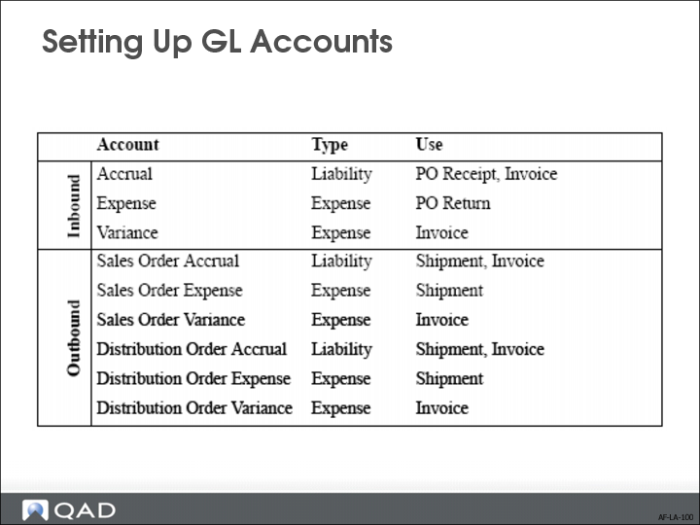
You must define the default GL accounts, sub-accounts, and cost centers that are accessed when logistics charges are accrued and invoiced. You can use separate sets of accounts to track inbound and outbound logistics charges.
For outbound logistics charges, you can use separate sets of accounts to track the costs associated with shipments to customers and shipments to other company locations. See
QAD Financials User Guide for information on setting up accounts.
The slide lists the accounts used by Logistics Accounting. The Type column indicates how the account is used. The Use column indicates the transactions that use the account.
Setting Up NRM Sequence Numbers
All pending invoices must have an internal reference number. Before you can accrue outbound logistics charges, you must set up separate Number Range Management (NRM) sequence codes used as identifiers for discrete sales order and distribution order shipments. See
QAD System Administration User Guide for details on Number Range Management.
The system uses the sequence codes to determine what format to use when assigning sequential internal reference numbers to discrete shipments.
This step is not required for other types of shipments. For sales order shippers, the shipper number is used as the internal reference. Shipper sequence codes are defined in Container/Shipper Control (7.9.24). When distribution orders use shipper documents, the shipper number is also used. Inbound logistics charge accruals use receiver or PO shipper numbers as internal references.
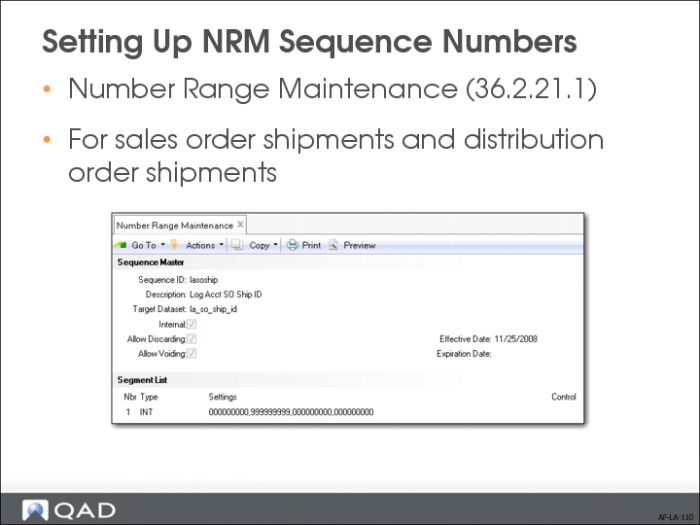
Use Number Range Maintenance (36.2.21.1) to create sequence parameters for sales order shipments and distribution order shipments. See
QAD System Administration User Guide for more information on number ranges.
Target Dataset
Enter the dataset identifier associated with this sequence:
• Enter la_so_ship_id for sales order shipments.
• Enter la_do_ship_id for distribution order shipments.
Internal
Enter Yes to have NRM generate sequence numbers automatically. Enter No to let users supply numbers that are validated against the NRM sequence.
Setting Up the Control Programs
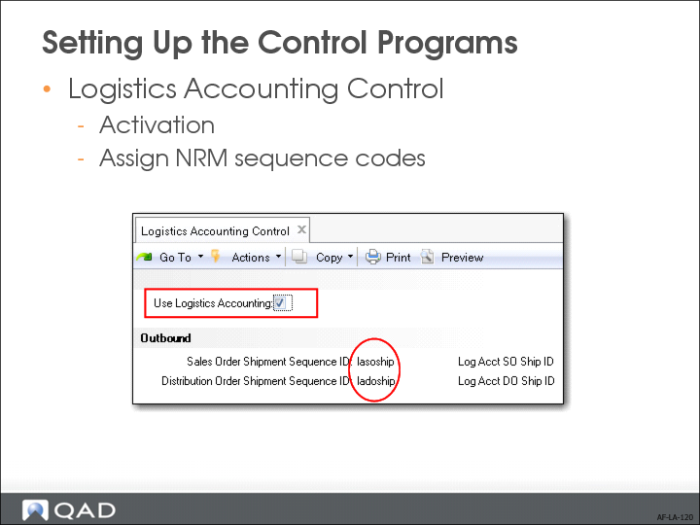
Use Logistics Accounting Control (2.15.24) to assign NRM sequence codes to sales order and distribution order shipments.
Sales Order Shipment Sequence ID
Enter the NRM sequence code used for sales order shipments. The sequence code must have the target dataset la_so_ship_id.
Distribution Order Shipment Sequence ID
Enter the NRM sequence code used for distribution order shipments. The sequence code must have the target dataset la_do_ship_id.
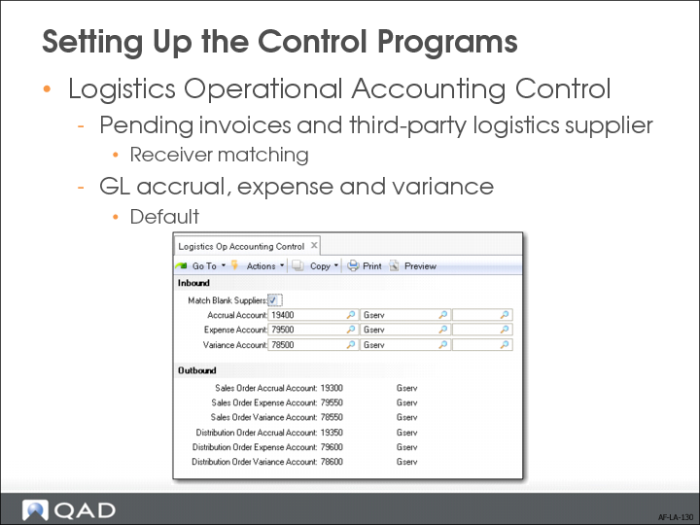
Use Logistics Operational Accounting Control (36.9.1) to:
• Specify whether pending invoices must contain a third-party logistics supplier before they can be selected for receiver matching.
• Specify default GL accrual, expense, and variance accounts for tracking inbound and outbound logistics charges. You can define a separate set of default outbound accounts for sales order and distribution order shipments.
If you only want to track inbound logistics charges, you can leave the Outbound fields blank. If you only want to track outbound logistics charges, you must first define inbound accounts when Verify GL Accounts is Yes in Domain/Account Control.
Match Blank Suppliers
When No, only pending invoices with a defined logistics supplier display when logistics charges are selected for matching in the Logistics Charge tab of Receiver Matching Create (28.2.1). The default is No.
When set to Yes, you can indicate during receiver matching whether to display pending invoices with blank suppliers by selecting the Include Blank Suppliers field in the Logistics Charge tab of Receiver Matching Create (28.2.1).
Defining Logistics Charge Codes
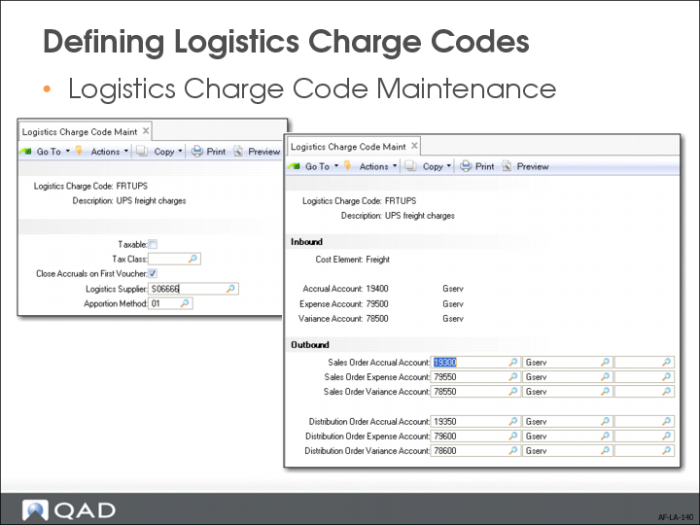
Use Logistics Charge Code Maintenance (2.15.1) to define codes for each logistics charge incurred and payable to a third-party supplier when purchasing or shipping items. You can also define the accrual, expense, and variance accounts used to track each logistics charge. These accounts default from Logistics Operational Accounting Control, but you can change them.
A logistics charge code can be used for inbound charges, outbound charges, or both. There is nothing to indicate whether a logistics charge code is used for outbound or inbound purposes. When an inbound and outbound charge is managed differently, define two separate codes.
Defining Detailed Logistics Accounts
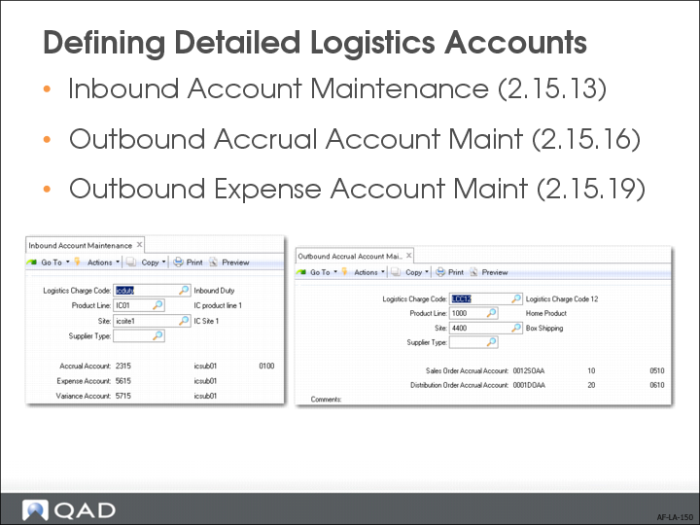
Although inbound and outbound logistics accounts are defined for each logistics charge in Logistics Charge Code Maintenance (2.15.1), you can define logistics accounts at a more detailed level.
You can separately track logistics charges by product line at multiple sites within the same entity. For example, you can track logistics charges for different product lines at different sites using separate accounts.
Use the following programs to specify GL accrual, expense, and variance accounts used for inbound and outbound logistics charges by product line, site, and supplier or customer type:
• Inbound Account Maintenance (2.15.13)
• Outbound Accrual Account Maint (2.15.16)
• Outbound Expense Account Maint (2.15.19)
All accounts default from the specified logistics charge code, but you can change them.
Setting Up Inbound Logistics Accounting
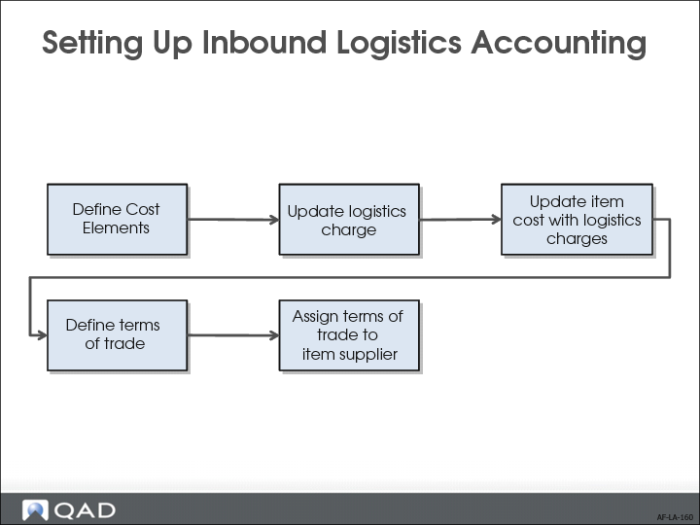
After the general data, set up additional data specific to inbound logistics:
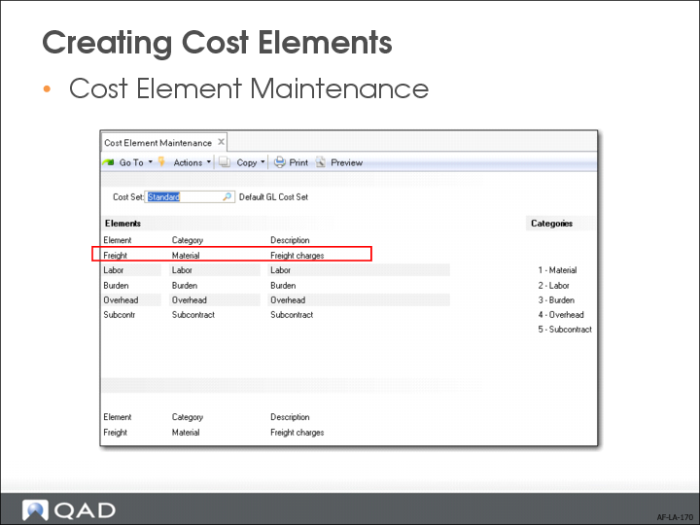
• Define cost elements for each logistics charge in Cost Element Maintenance (30.17.1).
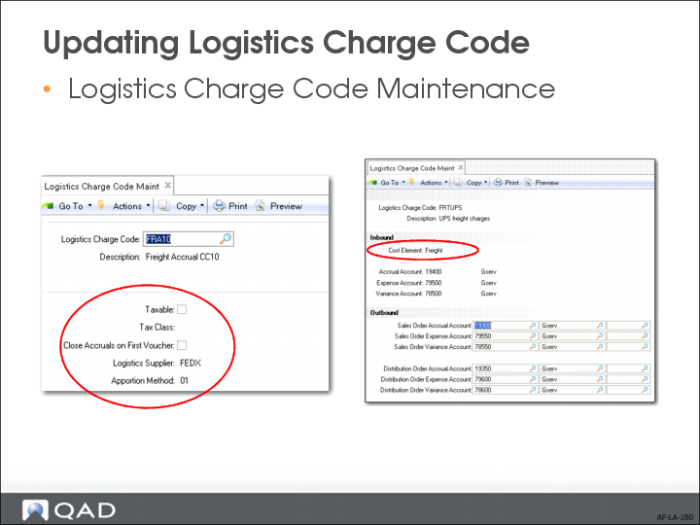
• Link logistics charges to the appropriate cost element in Logistics Charge Code Maintenance (2.15.1). One cost element can only link to one logistics charge.
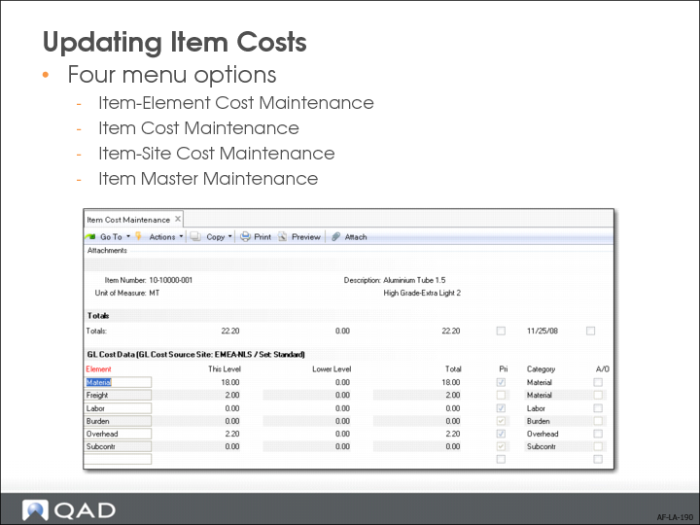
• Update item cost with logistics charges in Item Master Maintenance (1.4.1), Item Cost Maintenance (1.4.9), Item-Site Cost Maintenance (1.4.18), or Item-Element Cost Maintenance (30.17.5).
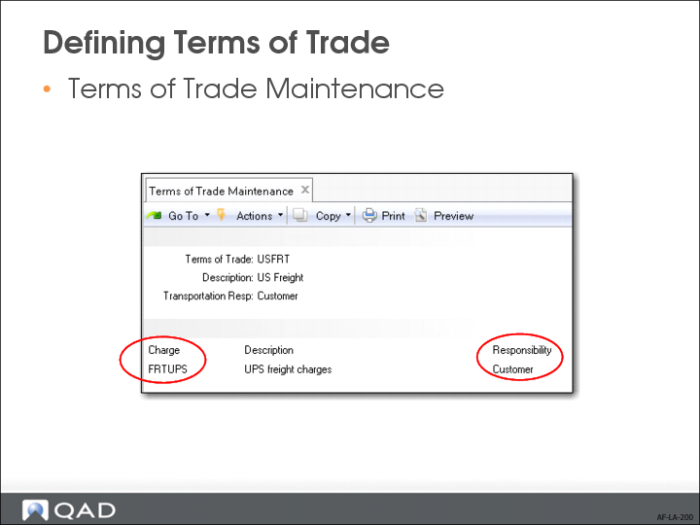
• Define Terms of Trade in Terms of Trade Maintenance (2.15.4).
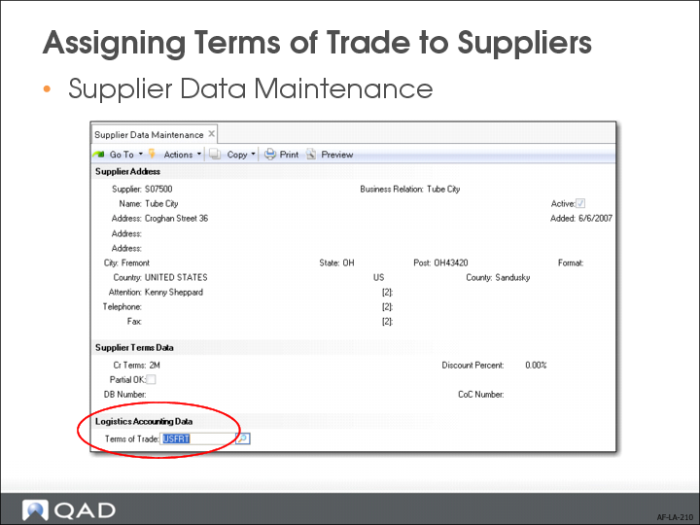
• Link Terms of Trade to the item supplier in Supplier Data Maintenance (2.3.1).
We will now review these steps in more detail.
Creating Cost Elements
Use Cost Element Maintenance (30.17.1) to set up separate cost elements for logistics charges in the GL cost sets assigned to sites that receive purchased items. The cost elements must be in the Material or Overhead cost category. See
QAD Costing User Guide for more information on cost elements and product costing.
Create a cost element for each logistics charge you want to accrue. For example, you could create separate cost elements for domestic freight and overseas freight, or create only one cost element for freight.
Updating Logistics Charge Code
When you have set up logistics cost elements, associate each of them with individual logistics charge codes in Logistics Charge Code Maintenance (2.15.1).
You can also assign default tax settings and logistics suppliers to the logistics charges to facilitate data entry.
Updating Item Costs
Use Item-Element Cost Maintenance (30.17.5), Item Cost Maintenance (1.4.9), Item-Site Cost Maintenance (1.4.18), or Item Master Maintenance (1.4.1) to add logistics cost elements associated with logistics charges to purchased items in the GL cost set and enter this-level logistics costs for those items. You must enter GL cost values in order to accrue logistics charges during purchase receipts.
Add the same cost elements to the current cost set when the last cost method is used for current costs. The value of the current cost will be updated when logistics charges are matched if Current Cost from AP is Yes in Inventory Control.
Defining Terms of Trade
Terms of trade specify both the logistics charges associated with purchasing items from external suppliers and the party responsible for paying each. These trade terms are specific to the purchase of items and define the obligations of the customer and seller for the delivery of goods. Terms of trade are also referred to as Inco Terms. Inco Terms are defined by the International Chamber of Commerce and used in international contracts.
During purchase receipts, the system determines which logistics charges to accrue based on the terms of trade assigned to the purchase order. When the receiving site is responsible for a logistics charge payment, the logistics charge is accrued since the charge is payable to a third-party logistics supplier, not the item supplier. Logistics charges are not accrued when they are the responsibility of the item supplier.
Use Terms of Trade Maintenance (2.15.4) to define new terms of trades.
When you (the customer) are responsible for transporting the goods, the system automatically populates the Transport Days field when a new order is created in Purchase Order Maintenance (5.7), Blanket Order Maintenance (5.3.1), and Supplier Scheduled Order Maintenance (5.5.1.13) with the Transit Days value in Delivery Transit Time Maintenance (2.16.1).
Each terms-of-trade record can include all of the logistics charges associated with a purchase, with the responsible party assigned to each logistics charge.
Assigning Terms of Trade to Suppliers
Assign default terms of trade to applicable item suppliers in Supplier Data Maintenance (2.3.1). The default terms of trade are used when the supplier is entered on the order header of a purchase order, blanket order, or supplier scheduled order.