QAD 2016 Enterprise Edition Training Guides
>
Financials-Advanced
>
Financials Report Writer
>
Report Chart and Report Cube
Report Chart and Report Cube
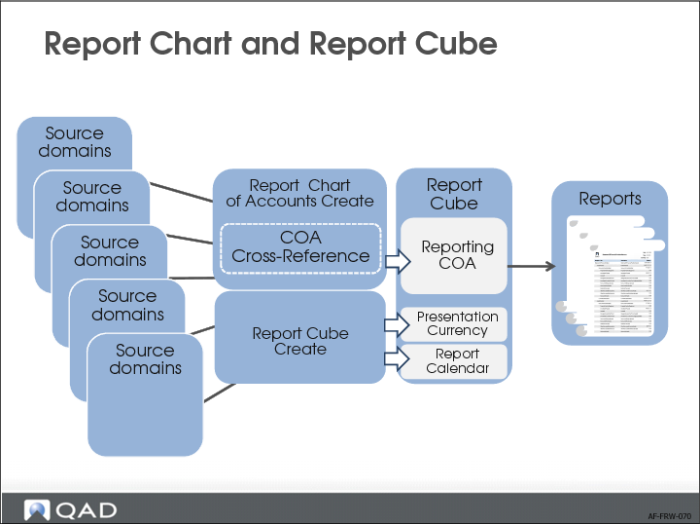
To collect data from different domains in a single report cube, you must perform three setup steps:
1 Use Report Chart of Accounts Create to define how the source domain chart of accounts is mapped to a target report chart of accounts.
2 Create COA cross-references using COA Cross Reference Modify or COA Cross Reference Excel Integration.
3 Use Report Cube Create to define the presentation currency, the currency translation methods, and the exchange rates applied for the report cube. You can also define a report calendar and map that to the GL calendars. You can define multiple presentation currencies.
Financial Report Writer lets you combine the accounting layers of Enterprise Financials in different ways so that each combination represents another GAAP (for example, local GAAP, US-GAAP, or IFRS) and you can then run the same report for different GAAPs.
Financial Report Writer is XBRL enabled, and you can tag all elements in the reports with XBRL XML tags, which are available in the output datasets of the reports.