Budget Create, FRW Budget
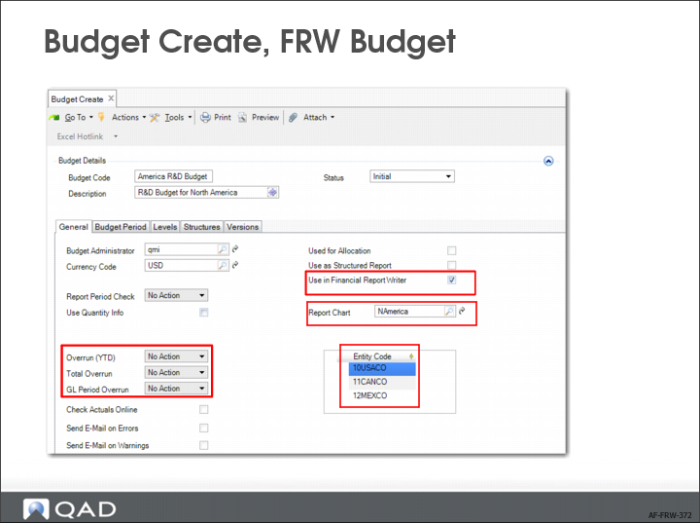
1 Open Budget Create (25.5.5.1).
2 In the Budget Details section, supply a meaningful budget code and description. In the example in these steps, you are creating a simple budget for North American R&D Finance.
3 On the General tab, select Use In Financial Report Writer.
Note: When you select Use In Financial Report Writer, the fields Report Period Check, Overrun (YTD), Total Overrun, and GL Period Overrun are no longer available. This restriction applies because budget checks are not currently supported for this type of budget. A budget for use in financial reports cannot be reused for any other purpose. If you want to use the budget for something else, create a copy.
4 On the General tab, select a report chart of accounts, which is a mandatory step. When you select a report chart, the Entity Code field is automatically populated with the entities associated with that report chart and becomes read-only. If you want to create a budget for specific entities, create topics in the Structure tab that are linked to detailed COA dimensions or report analysis codes that contain those entities.