Sales Order Shipments
• Records that you have fulfilled all or part of your customer order
• Can process SO shipments only against open sales orders
• Shipping items sets the Quantity to Invoice equal to the Quantity Shipped
Create an invoice for each shipment
Or set Ready to Invoice = No to hold up invoicing until the order is shipped
• Multiple shipments can be processed against one order
• Once all line items on an order are shipped and invoiced, the system closes the SO
• Shipments relieve inventory and charge Costs of Goods Sold (COGS) accounts
Sales Order Shipments
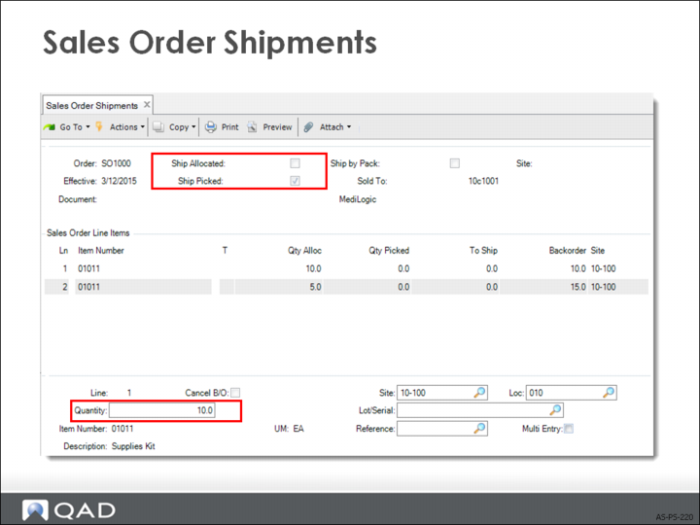
• When Ship Allocated is set to Yes, the To Ship field is automatically populated with the allocated amount for each line. When set to No, you can manually set the quantity to ship for each line:
a Specify the SO number, which lists the line items and the quantity open (ordered but not yet shipped).
b For each line item enter the quantity and the Site, Location, Lot/Serial, and Ref.
When Multi-entry is Yes, another screen displays for a list of sites, locations, lot/serial, lot reference numbers, and quantities.
• You can also change the add-on charge amounts, the carrier, bill of lading (BOL), and invoicing.
• To hold up invoicing until the remainder of the order ships, set Ready to Invoice = No.
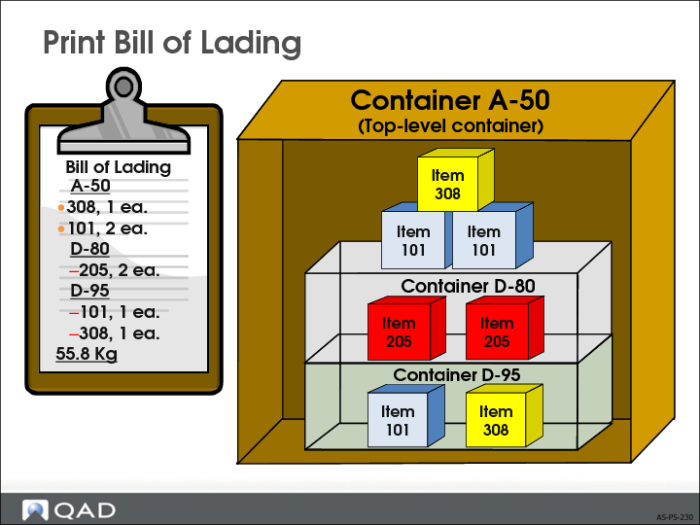
Print Bill of Lading
• Bill of lading identifies the contents of all containers, including embedded items.
• Shows a final summary of the package weight.