QAD 2016 Enterprise Edition Training Guides
>
Allocations and Shipping
>
Use Reserved Locations
>
Set Up Reserved Locations
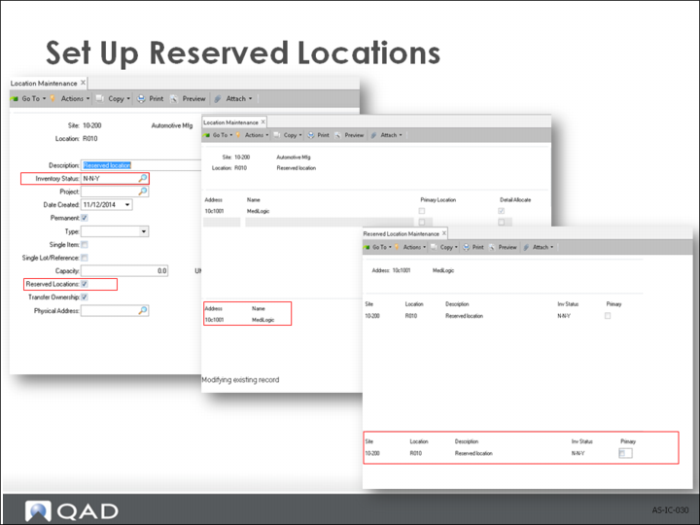
Set Up Reserved Locations
• To assign reserved locations to specific customers, use Reserved Location Maintenance to adjust the reserved location data set up in Location Maintenance.
• The management of inventory in a reserved location depends on assigning an appropriate inventory status code to the location.
Important: Since all inventory detail records in the location must have the correct status code, create new locations for the reserved inventory.
• Set Available to Allocate to No to prohibit allocating inventory from reserved inventory to undesignated customers. This setting does not affect customers who have been assigned a reserved location.
• Set Nettable to No to exclude reserved inventory from Materials Requirement Planning (MRP) functions. Otherwise, the system counts reserved inventory in its planning functions, and inventory shortages for other customers can occur.
• Set Overissue to Yes or No, depending on your inventory management policy on issuing inventory from a location that has a zero or negative inventory balance.
• Set up restricted transactions for all non-sales order transactions. This setting prohibits non-sales order transactions for reserved locations inventory. For example, apply restrictions to work order component issue, DRP shipments, RMA shipments, issue and receipt transactions, and others that can allow other order functions to access reserved-location inventory.
Use Reserved locations
• The system checks for reserved location records for the
• Ship-to customer address, then
• Sold-to address, and finally
• Bill-to address
• If a record is found with Primary set to Yes, this location is used as the default.
• If reserved locations are found but none are designated as primary, the first reserved location found alphabetically within the site is used as the default.