Create Control Program Exceptions
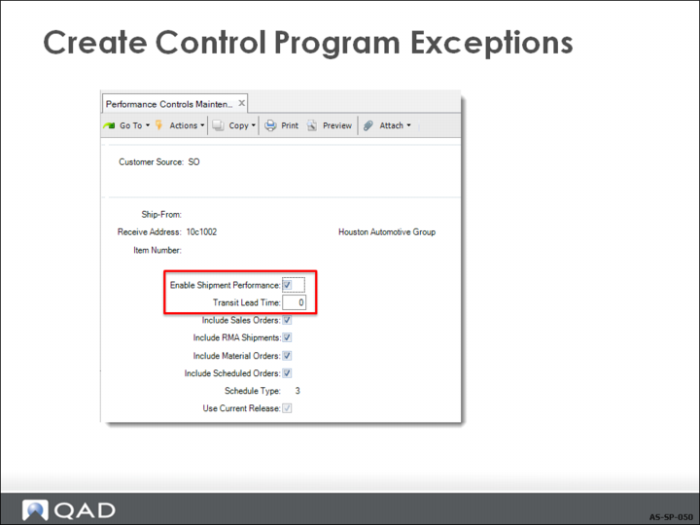
Use Performance Controls Maintenance to create control records that override general settings in Shipment Performance Control. The detailed control records are used to collect performance data for unique key combinations of customer source, ship-from, receive address, and item number.
Enable Shipment Performance
Enter Yes to collect performance data for the specified combination of customer source, ship-from site, receiving address, and item number. Enter No if you do not want performance data for this key combination.
Transit Lead Time
Optionally enter the number of days it normally takes a shipment to reach the receive address after that shipment leaves your dock. Leave the default 0 (zero) to omit the transit time.
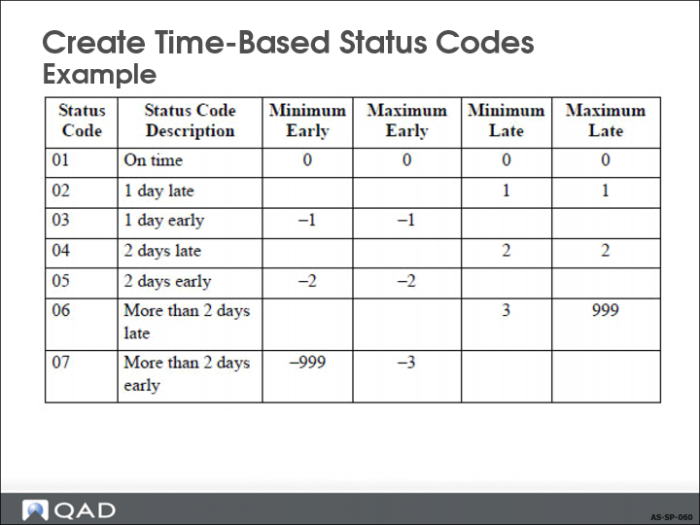
In your baseline, create status codes that cover all shipment situations. For example, even if you do not normally make shipments more than two days late, create a status code to address that possibility. For this status code, the minimum late value would be 3. The maximum late value would be 999. The system assigns this status code to all shipments made more than two days late.
If you do not create contingency status codes and the system encounters a shipment where none of the available status codes apply, the performance transaction record is created with a blank status code. Use Shipment Performance Data Maintenance (7.9.17.13) to add status codes to these transaction records.
Once you establish a baseline, you can specify codes for unique combinations of shipment areas, like a specific customer or item, so that you can monitor performance trends.