Create Time-Based Status Codes
Note: Status codes must be unique for a customer source.
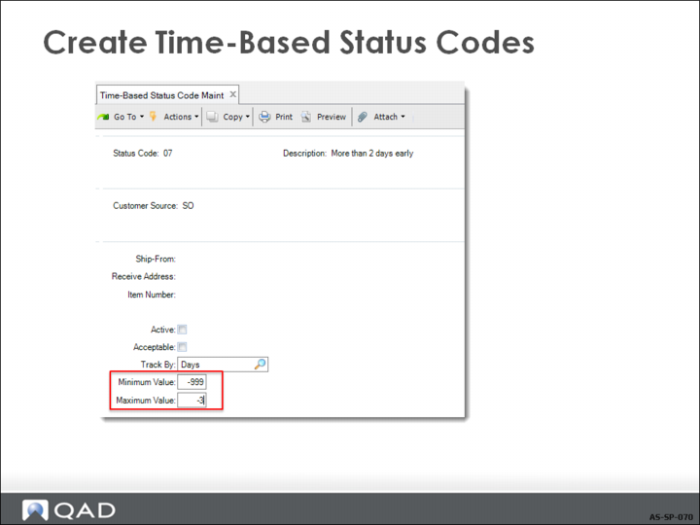
Minimum
Enter the minimum number of hours or days a shipment can be early or late to be assigned this status code. This value must be the same or less than the value entered in the Maximum field. If you specified Hours in Track By, the values in Minimum and Maximum represent hours. If you specified Days, the values represent days. To designate an early status code, use negative numbers. To designate a late status code, use positive numbers.
Maximum
Enter the maximum number of hours or days a shipment can be early or late to be assigned this status code. This value must be the same or greater than the value in the Minimum field.
Create Quantity-Based Status Codes
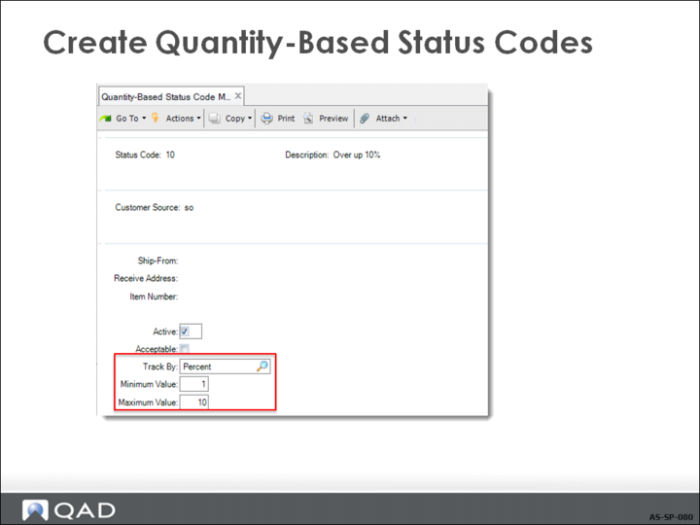
Similar rules apply to creating quantity-based status codes as time-based status codes. Use the same key values to assign status codes for specific shipping situations. You create quantity-based exception status codes by setting Acceptable to No.
Indicate how the system measures shipment completeness by entering Number or Percent in the Track By field. Shipment percent is calculated as the actual shipment quantity, divided by the required ship quantity.
When Track By is set to Number, beginning and ending ranges associated with status codes cannot overlap. When Track By is set to Percent, the beginning or ending range for one status code can overlap with another.
The Minimum and Maximum field range indicates an overshipped and undershipped quantity or percentage range for each status code. To designate an undershipment status code, use negative numbers. To designate an overshipment status code, use positive numbers.