Create Legal Documents
Examples of issuing functions that generate legal documents are as follows.
• Pre-Shipper/Shipper Workbench (7.9.2)
• Pre-Shipper/Shipper Print (7.9.4)
• Sales Order Shipper Maintenance (7.9.8)
• Sales Order Shipments (7.9.15)
• Unplanned Issue (3.7)
• Item Transfer (3.4)
• Distribution Order Shipments (12.17.22)
• Sub Shipper Maintenance (18.22.5.5)
• Material Order Maintenance (10.7.1 and 11.11.1)
• Material Order Shipments (10.7.6 and 11.11.6)
• Call Activity Recording (11.1.1.13)
• RMA Maintenance (11.7.1.1)
• RMA Shipments (11.7.1.16)
• RTS Shipments (11.7.3.16)
• Distribution Order Shipments (12.17.22)
• Sub Shipper Maintenance (18.22.5.5)
• Material Order Maintenance (10.7.1 and 11.11.1)
• Material Order Shipments (10.7.6 and 11.11.6)
• Call Activity Recording (11.1.1.13)
• RMA Maintenance (11.7.1.1)
• RMA Shipments (11.7.1.16)
• RTS Shipments (11.7.3.16)
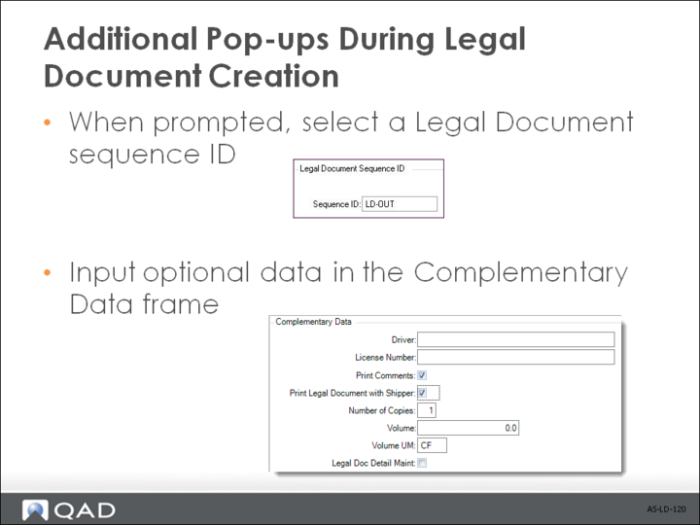
During shipper processing, additional legal document pop-up window displays when:
• The current shipment belongs to a shipping group with the appropriate inventory movement details set up:
• The transaction flow of the inventory movement code is Outbound or Inbound;
• The document format defined for the shipper is associated with a valid legal document form code.
• A legal document NRM sequence has been defined and assigned to the issuing site with Transaction Flow set to Outbound.