Cost Sets in QAD EE
The term cost set is used to identify cost records in the system. QAD Enterprise Applications has two default cost sets—GL and Current—that are available for each site, but it can have additional cost sets, too. Cost sets have multiple uses.
Maintain General Ledger Item Costs (GL Cost Set)
GL cost is a term that distinguishes costs used for valuing inventory and for determining cost of goods sold from other costs such as current costs. GL costs can be based on either a standard or an average cost method.
Maintain Current Item Costs (Current Cost Set)
The current cost of an item is normally based upon recent production and/or purchases. Current costs are the actual costs from inventory receipts and work order labor transactions.
• When the method used for the GL cost set is standard costing, the current cost set can be used to track the running average or last cost for use in determining next year’s standard cost or for providing a record of recent actual costs
• Methods that can be used with current are Last, Average or None
Last: Each receipt sets the current cost to the last cost of that item. In the case of purchased material, this is the purchase or invoice price.
Average: Whenever an item is received, the new average cost is calculated and stored in the cost set
None: Current costs are maintained manually in the system or not used
Maintain Historical Item Costs
Historical costs (standard or current) are costs from prior periods that are used for comparison purposes. These costs are stored in one of the additional cost sets of the Cost Management module.
Develop Simulated Item Costs
Simulated costs are costs used for planning purposes to evaluate the effects of differing scenarios of, for example, material price inflation, or batch size, labor and burden rate changes. These costs are stored in one of the additional cost sets of the Cost Management module.
Maintain Frozen Standard Costs
Once standard costs are established, you can freeze them to prevent costs from being recalculated. Any cost set can be frozen. Running the Cost Roll-Up Freeze/Unfreeze (13.12.1) marks item costs for this cost set and site as frozen. When QAD Enterprise Applications routing and product structure cost roll-up functions see that an item cost has been frozen, the roll-up simply uses the existing frozen cost; it does not recalculate it.
Note: Only one set of GL and Current costs are allowed per site.
Cost Categories
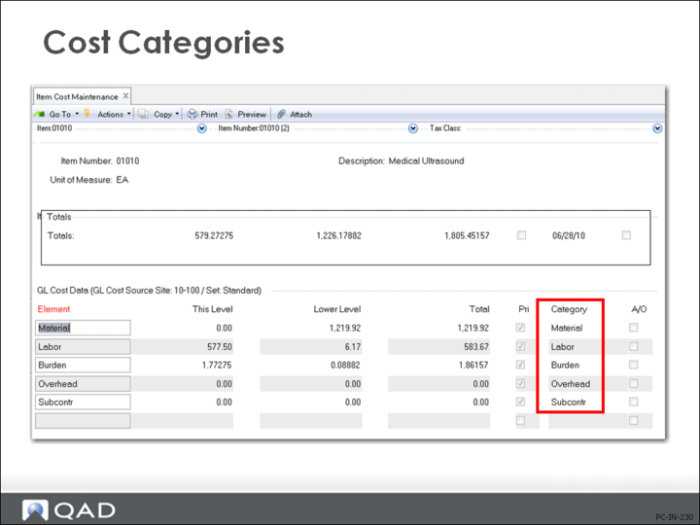
There are five categories of costs tracked for each cost set. These categories, described below, are tracked for both this-level and lower-level costs in QAD Enterprise Applications and contain cost elements that, by default, have the same name as the category. (“This level” refers to costs incurred at the level at which you define the item; “lower level” refers to costs associated with the item’s components or manufactured items in the BOM.)
Material
Represents the cost of purchased materials.
For purchased items, the material cost is maintained in the This Level Material field by manually entering the data in the item cost maintenance screens: Item Master Maintenance (1.4.1), Item Cost Maintenance (1.4.9), or Item Site Cost Maintenance (1.4.18).
For manufactured items, the material cost is maintained in the Lower Level Material field by rolling up the product structure costs using Product Structure Cost Roll-Up (13.12.13).
Labor
Represents the direct labor cost applied to this product, including setup labor. Labor cost is calculated from labor rates and run/setup hours at each operation in a product’s routing.
It is updated at This Level by running a Routing Cost Roll-Up (14.13.13) and updated for Lower Levels by running a Product Structure Cost Roll Up (13.12.13). You would not expect to have labor costs for purchased items.
Burden
Represents the variable overhead cost applied to this product, based on labor and/or machine burden rates.
As with labor, burden cost is maintained for This Level through Routing Cost Roll-Up (14.13.13). Burden cost is updated for Lower Levels by running a Product Structure Cost Roll-Up (13.12.13). You would not expect to have burden costs for purchased items. Burden costs can also be updated by using Item Burden Cost Update (1.4.20).
Overhead
Represents the fixed overhead cost for this item - for example, utilities. Another example would be the expense of operating purchase or supplier logistics functions, which could be recovered as fixed overhead on all purchased items based on a percentage of their cost. This is often a better solution than the arbitrary addition of such costs to general burden.
Overhead cost is maintained manually for each item in item cost maintenance screens: Item Master Maintenance (1.4.1), Item Cost Maintenance (1.4.9), or Item Site Cost (1.4.18). Or it can be maintained by assigning it as a percentage of other cost categories in Item Overhead Cost Update (1.4.21).
For purchased materials, you would normally see only This Level overhead costs, but for manufactured items, you might have both This Level and Lower Level overhead costs. Overhead cost is updated for lower levels by running a Product Structure Cost Roll-Up.
Subcontract
Represents the cost of outside processing as entered in each routing operation for manufactured items in Routing Maintenance (14.13.1).
Subcontract cost is updated by Routing Cost Roll-Up (14.13.13) for This Level, and Product Structure Cost Roll-Up (13.12.13) for Lower Level costs.
Cost Elements
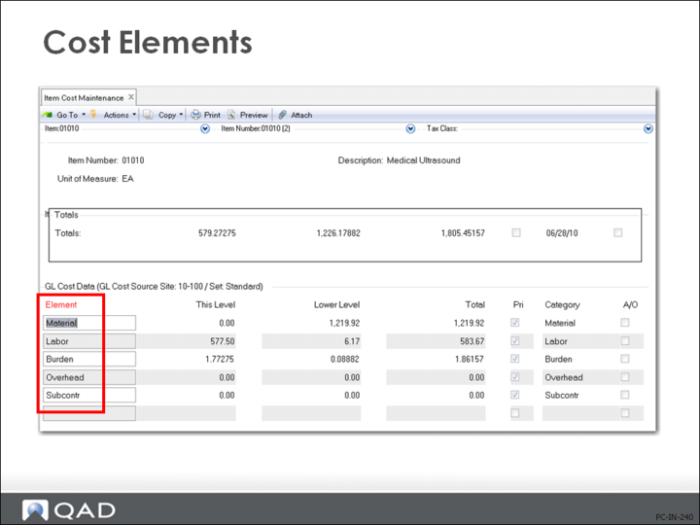
Cost elements group different types of costs within a single cost category.
• All costs are associated with a cost category: material, labor, burden, overhead, or subcontract. When item costs are rolled up, totals are maintained for each category. Each cost category must have at least one cost element.
• The default cost elements - material, labor, burden, overhead, and subcontract - are created whenever costs are copied from a current or GL cost set
Note: Other cost elements can be added by using the Cost Management module. The additional cost elements can record different types of costs or further subdivide these categories. For example, if material costs include purchasing unit cost, purchase overhead, and transportation charges, a separate cost element can be set up for transportation charges, allowing you to track costs and simulate the effect of changes. (See Cost Management Course.) These new cost elements still belong to one of the five cost categories, which control posting to the GL.
Study Questions
What are the five cost categories in QAD applications?
What are the two default cost set names in QAD applications?
What is the point of the two cost sets in a standard cost system?
If you want to retain a cost set reflecting the prior years ending cost what module would you use?