QAD 2016 Enterprise Edition Training Guides
>
Product Costing Introduction
>
Account Structures
>
Accounting Structure Topics: Reference
Accounting Structure Topics: Reference
In this section, we will look at how to read the GL Reference and Distribution lines, followed by a discussion of account defaults and where accounts are set up.
GL Reference
Every transaction is identified by a GL reference code consisting of the GL transaction type, the date that the transaction should update the GL, and the transaction number.
The transaction type indicates the module or activity (for example, IC stands for Inventory Control) that originated the transaction.
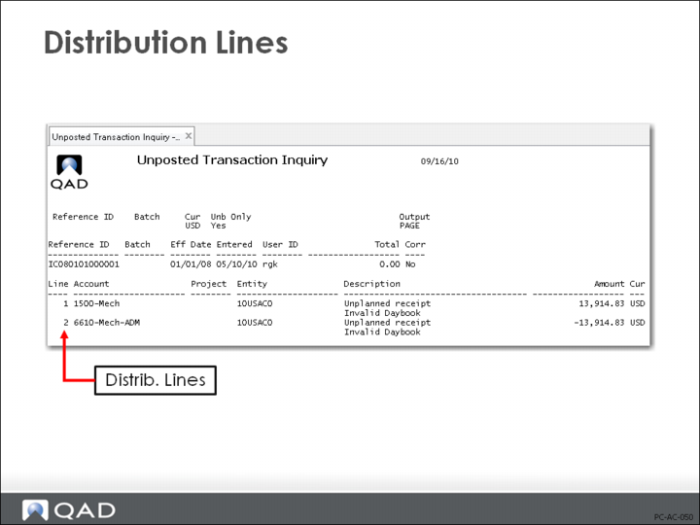
Distribution Lines
In addition to the information used to identify the transaction, the transaction record consists of one or more distribution lines—debit and credit amounts that you will post to GL accounts at period-end.
In QAD Enterprise Applications all GL distribution lines are created for a specific entity and account combination. The entity indicates which business the transaction affected, and the account indicates which assets, liabilities, income or expenses were changed.
In the example above, account and cost center are shown. Sub-account and project can also be included.
A more complex transaction, a sales order invoice for example, can have many distribution lines. A credit to sales a debit to accounts receivable, a credit to sales discount, a credit to sales commissions, and a credit to tax liability. The distribution lines should balance.