QAD 2016 Enterprise Edition Training Guides
>
Product Costing Introduction
>
Account Structures
>
Inventory Account Maintenance
Inventory Account Maintenance
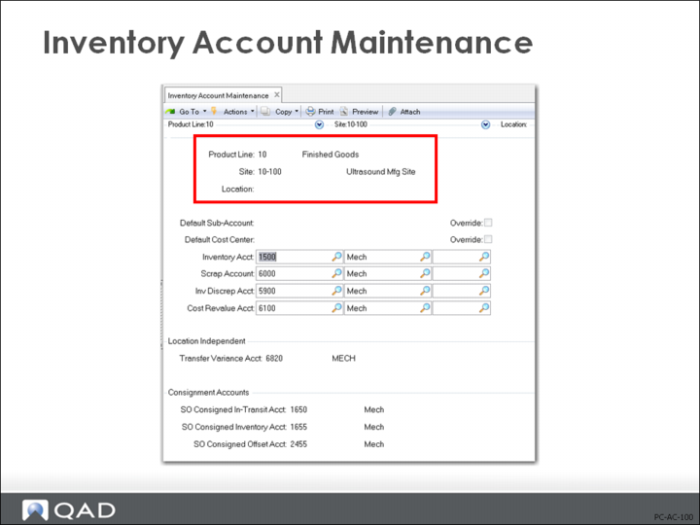
Usually inventory balances are maintained by product line, but you can specify inventory accounts in more detail than Product Line Maintenance (1.2.1), allows. If so, you can set inventory accounts by product line, site, and location in Inventory Account Maintenance (1.2.13), to obtain the level of detail that you want. Location is optional and allows you to set inventory accounts differently for multiple sites within a product line.
Product Line Purchasing Accounts
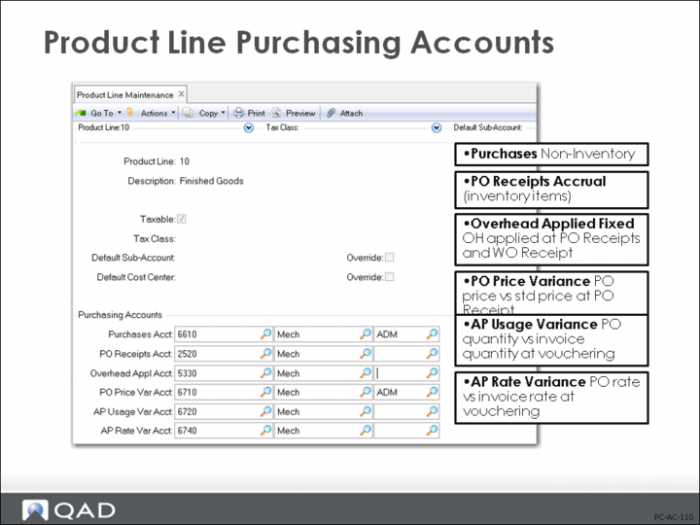
Another group of accounts is used to monitor Purchasing and Accounts Payable activities. These purchasing accounts include variance accounts, which are used to evaluate your internal performance and that of your suppliers.
Purchases
Records purchases of non-inventory (expense) items that exist in the Item Master. Default account usually amended.
PO Receipts (accrued AP) for Inventory Items
Accrues purchase order receipts prior to receipt of supplier invoices. The Inventory account is debited for the GL cost of the item less any overhead amount multiplied by the quantity received. The Purchase Order Receipts account is credited for the purchase order price times the quantity received.
PO unit price * PO qty received
Overhead Applied
Tracks fixed overhead amounts applied at purchase and manufacturing item receipts. When receipt transactions are made, the system credits the Overhead Applied account and debits Inventory for this-level overhead amount.
PO Price Variance
Tracks the difference between the PO price for an item and the total standard cost of the item at the time the PO is received (less any overhead amount).
[PO unit price – (total GL unit cost – overhead)] * PO qty received
When a purchase order item is received, the system creates a debit to Purchase Price Variance in addition to a debit to Inventory in the event the PO price is higher. It does so in order to balance the credit to Purchase Order Receipts.
AP Usage Variance
Tracks the difference between PO quantity received and supplier invoice quantity when receipts are vouchered.
(Invoice qty – PO receipt qty) * PO unit cost
A positive variance (invoice quantity larger than received quantity multiplied by the PO unit price) is debited to the Accounts Payable Usage Variance account and credited to the PO Receipts account, which now contains both the original receipt value plus the value of the discrepancy between the original receipt quantity and the quantity that was vouchered.
AP Rate Variance
Tracks the difference between PO price and supplier invoice price when receipts are vouchered.
(Invoice unit cost- PO unit cost) * invoice qty
In the case of a higher price, the Accounts Payable Rate Variance account is debited and the PO Receipts account is credited. The PO Receipts account contains the original receipt value plus the AP Usage Variance and the value of the discrepancy between the original PO cost and the cost that was vouchered.
Sales Accounts
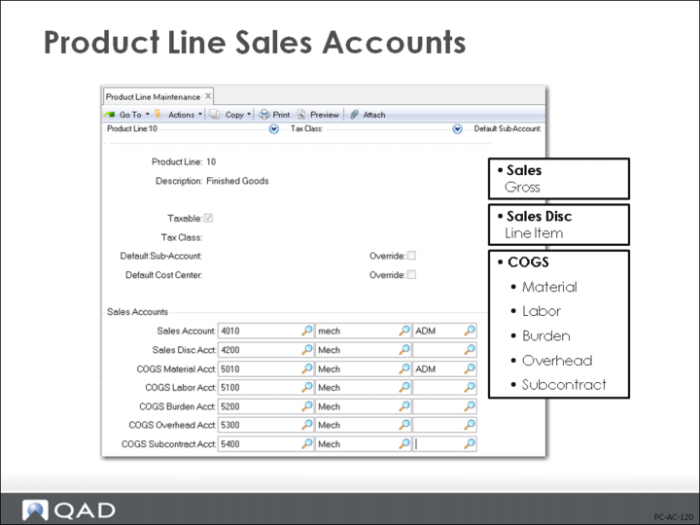
Sales and cost of sales amounts are tracked by product line. The GL accounts for Sales and Sales Discounts default from the sales accounts if defined in Sales Account Maintenance (1.2.17); otherwise, from the item product line (Product Line Maintenance (1.2.1)).
Sales
Tracks gross revenue from sales
Sales Disc
Tracks sales order line discount amounts
Note: Price List Maintenance (1.10.1.1), Discount Account field: If a discount account, cost center, or project is specified in Price List Maintenance, then any discounts arising from the selected price list are posted to that account, cost center, or project. If no account, cost center, or project is specified, the discount amounts are posted to the Discount account specified in Sales Account Maintenance (1.2.17), or Product Line Maintenance (1.2.1). If you want to segregate discount postings based on sales order information, such as product line or sales channel, then you should leave the Disc Acct and Accrual fields blank in Price List Maintenance.
The item’s GL cost is used to post Cost of Goods Sold (COGS). This amount is split into the five major cost categories of material, labor, burden, overhead, and subcontract.
COGS Material
Tracks the material portion of cost of sales. Each time a shipment occurs, a credit is made to the Inventory account for the total GL cost of the item times the quantity shipped and a debit for the COGS material portion.
COGS Labor
Tracks the labor portion of cost of sales. Each time a shipment occurs, a credit is made to the Inventory account for the total GL cost of the item times the quantity shipped and a debit for the COGS labor portion.
COGS Burden
Tracks the variable overhead portion of cost of sales. Each time a shipment occurs, a credit is made to the Inventory account for the total GL cost of the item times the quantity shipped and a debit for the COGS burden portion.
COGS Overhead
Tracks the fixed overhead portion of cost of sales. Each time a shipment occurs, a credit is made to the Inventory account for the total GL cost of the item times the quantity shipped and a debit for the COGS overhead portion.
COGS Subcontract
Tracks the subcontract portion of cost of sales. Each time a shipment occurs, a credit is made to the Inventory account for the total GL cost of the item times the quantity shipped and a debit for the COGS subcontract portion.
Note: If you do not want to track the COGS costs by cost category, then you can set the accounts to be the same for all five categories.
Sales Account Maintenance
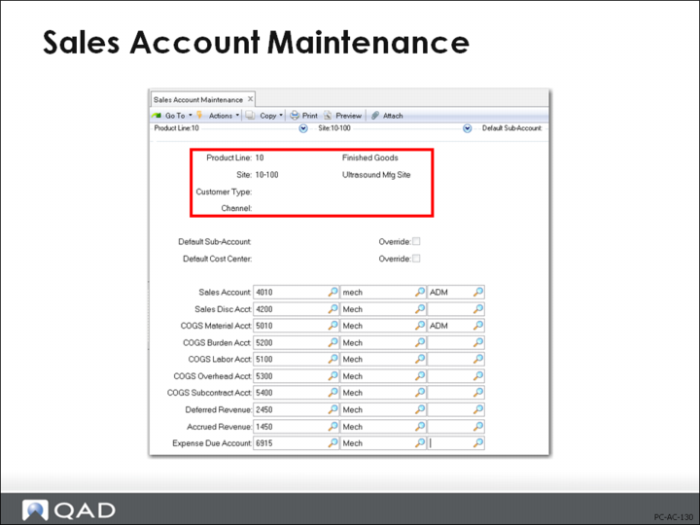
In some cases, you can break sales information down into more detail than is available through product lines. In that case, if you additionally define sales accounts for a product line by site, customer type (hospitals, doctors’ offices) and/or channel (direct, OEM) in Sales Account Maintenance (1.2.17), you can use different accounts in sales transactions. In this function, you must specify product line and site, but only need to use customer type and channel if you want more levels of detail.
Note: The Customer Type is associated with the customer record, and the system will look it up during sales account assignment in sales order processing. But Channel must be entered manually on each sales order. A blank Channel code is valid if accounts are assigned strictly by Customer Type.