QAD 2016 Enterprise Edition Training Guides
>
Product Costing Introduction
>
Account Structures
>
Department Accounts
Department Accounts
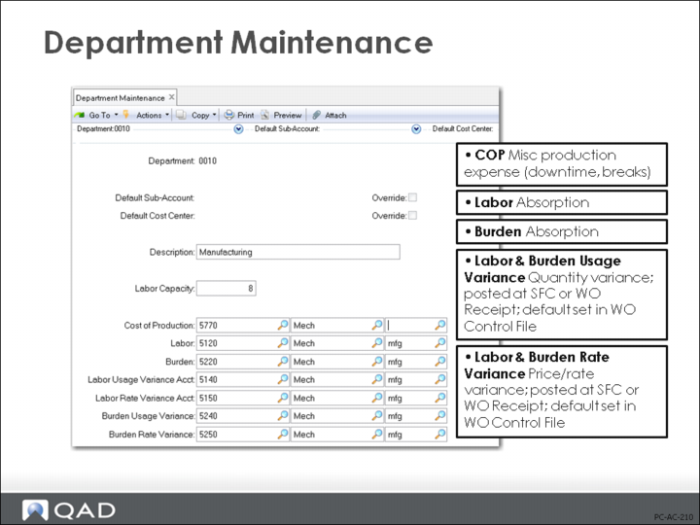
Manufacturing costs are grouped by department. When you create department records, the accounts to be used for transactions associated to this department default from Domain/Account Control, and can be changed to any other valid account.
The department account codes are similar to the GL account codes for product lines. They are used when reporting labor and downtime in the Shop Floor Control and Advanced Repetitive/Repetitive modules, and when backflushing inventory and closing the accounting for completed work orders. More detailed information about these accounts follows.
Cost of Production
Used for indirect labor using non-productive labor reporting, or for downtime reporting.
Labor (absorption)
Used to accumulate the labor cost for a department. The standard hours at the standard rate are debited to WIP and credited to the Labor and Burden accounts. Labor usage and burden usage variances are calculated and credited to the Labor and Burden accounts, respectively. And labor rate variances are calculated and credited to the Labor and Burden accounts.
Burden (absorption)
Burden is the variable overhead associated with production operations, and the burden account is used to accumulate accrued burden for a department. It is used in conjunction with labor reporting and the backflushing of standard labor. Both direct and downtime hours (if employee and work center are specified in Downtime Transaction) will be burdened, while non-productive hours reported will not be.
Labor Usage Variance
For standard cost, labor usage variance is used to track the difference between the actual time reported and the standard time set for both setup and run labor. Since standard hours are inflated to cover yield losses, differences due to yield will be reflected in labor usage variance.
Labor Usage Variance =
[(actual setup hrs – std setup hrs) * std setup rate] + [actual run hrs – std run hrs) * std run rate]
Std run hrs = std run hrs/unit * (qty completed + qty rejected)
Labor Rate Variance
Tracks the difference between the actual employee pay rate (including overtime and shift differential) and the work center standard labor rate.
Labor Rate Variance =
[(actual setup rate – std setup rate) * actual setup hrs] + [(actual run rate – std run rate) * actual run hrs]
Burden Usage Variance
Tracks the difference in burden costs due to the actual hours reported varying from the standard hours required on the routing.
Burden Usage Variance =
[(actual setup hrs – std setup hrs) * std setup burden] + [(actual run hrs – std run hrs) * std run burden]
Where:
Std setup burden = (std setup rate * bdn%) + lbr bdn rate + (mach bdn rate * mach/op)
Std run burden = (std run rate * bdn%) + lbr bdn rate + mach bdn rate
Burden can be a percentage of labor, a fixed rate per labor hour for machine, or the sum of these.
Burden Rate Variance
Tracks the difference in burden costs due to the employee’s actual pay rate varying from the work center standard labor rate. This applies only if burden is calculated as a percentage of labor cost and the employee’s pay rate is different than the work center standard.
Burden Rate Variance =
[(actual setup bdn – std setup bdn) * actual setup hrs] + [(actual run bdn – std run bdn) * actual run hrs]
Where
Actual setup burden = (actual setup rate * bdn%) + lbr bdn rate + (mach bdn rate * mach/op)
Std setup burden = (std setup rate * bdn%) + lbr bdn rate + (mach bdn rate * mach/op)
Actual run burden = (actual run rate * bdn%) + lbr bdn rate + mach bdn rate
Std run burden = (std run rate * bdn%) + lbr bdn rate + mach bdn rate
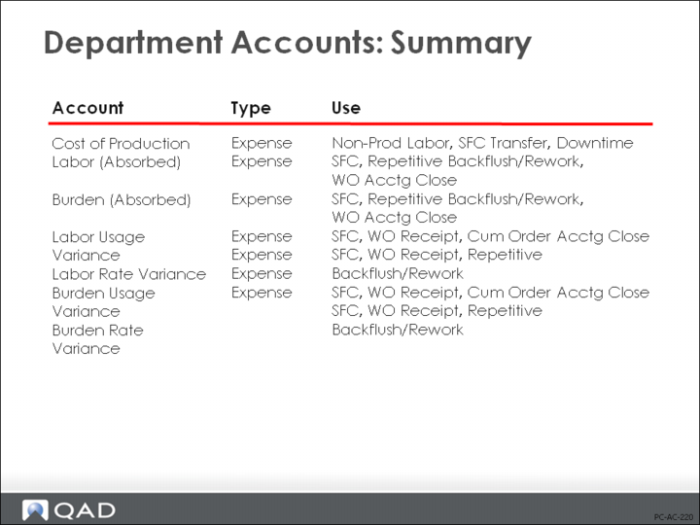
Summary of Department Accounts
The figure above is a summary of the accounts for a department, the account type, and the kinds of transactions on which the accounts might appear.