Route PCR
• Similar to PCOs, the PCRs are selected for routing through the approval cycle
• Used to place product change requests (PCRs) into the approval cycle
Route PCR for Approval (1.9.2.4)
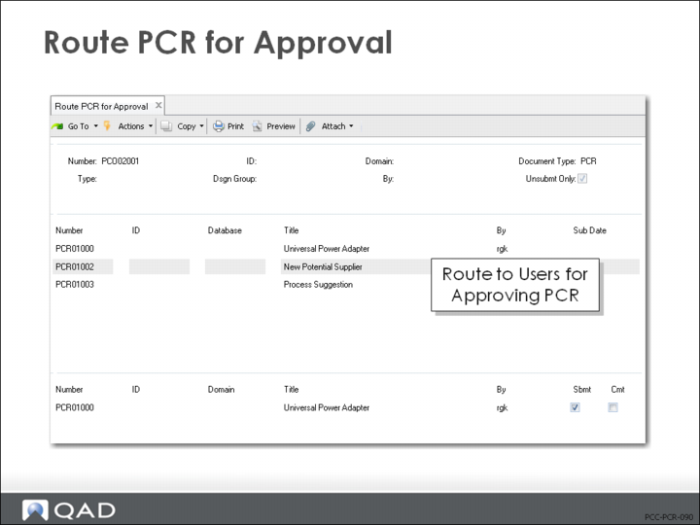
• Based on the selection criteria in the first frame, a listing of PCRs appears in the second frame
• Use the arrow keys to scroll through the list and click Next to select an entry
• In the bottom frame change the submission status of the PCR and attach comments
• Once submitted, the PCR becomes visible to PCR/PCO Approval (1.9.6.1)
• Its status changes to Submit in PCR/PCO Status Browse (1.9.11) and a submission date is attached
See in this training guide: Print PCR/PCO.
• Submitted PCRs can be unsubmitted by running Route PCR for Approval with the Unsubmit Only = No, and then changing Sbmt from Yes to No
• If anyone has approved the PCR, it will not display for update
• The approval must be reversed in PCR/PCO Approval (1.9.6.1) before it can be unsubmitted
Exercise: Route PCR for Approval
1 Allow QAD EE to automatically select the PCR available for submittal.
a Doc Type = PCR and Unsubmt Only = Yes. Click Next to continue.
b Click Next to accept the PCR in the first frame. Sbmt = Yes in the second frame. Click Next.
Hint: Use Route PCR for Approval (1.9.2.4).
2 Review your PCR to see the status change. The Status should be = Submit.
Hint: Use PCR/PCO Status Browse (1.9.11).