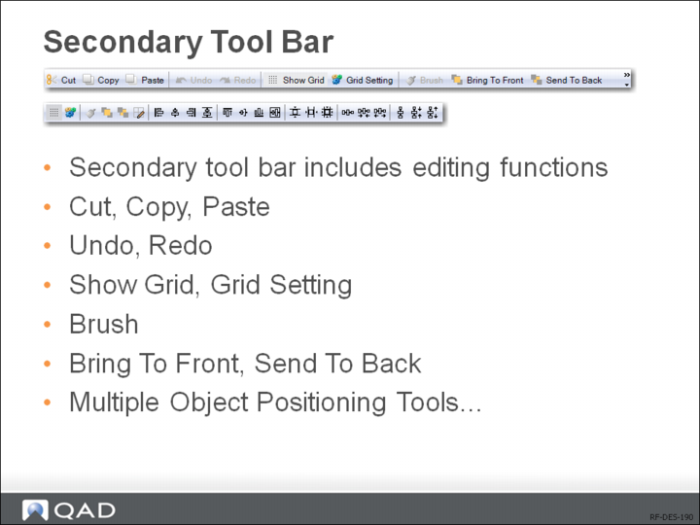
Secondary Tool Bar
Cut
Cut the selected objects on the report.
Copy
Copy the selected objects on the report to the clipboard.
Paste
Paste cut or copied objects from the clipboard to the currently selected area on the report.
Undo
Undo any actions you have performed on the report.
Redo
Redo the actions you have undone.
Show Grid
Toggle background grid on and off.
Grid Settings
Configure grid settings such as grid units and grid spacing.
Brush
When multiple objects are selected, apply the format of the last selected object to all other selected objects.
Bring to Front
Bring the selected object to the foreground.
Send to Back
Send the selected object to the background.
The “Multiple Object Positioning Tools” only apply to multiple objects on the report and will be grayed if only one object is selected:
Table Fields
Merge selected objects into table fields.
Align Left
Align multiple selected objects to the left boundary of the last selected object.
Align Center
Horizontally align multiple selected objects to the center of the last selected object.
Align Right
Align multiple selected objects to the right boundary of the last selected object.
Center Horizontally on Section
Horizontally position selected objects to the center of the section.
Align Top
Align multiple selected objects to the top boundary of the last selected object.
Align Middle
Vertically align multiple selected objects to the middle of the last selected object.
Center Vertically on Section
Vertically position selected objects to the center of the section.
Align Bottom
Align multiple selected objects to the bottom boundary of the last selected object.
Equal Height
Resize multiple selected objects to the same height.
Equal Width
Resize multiple selected objects to the same width.
Equal Size
Resize multiple selected objects to the same height and width.
Equal Horizontal Spacing
Reposition multiple selected objects so that they are equally spaced out horizontally.
Decrease Horizontal Spacing
Horizontally reduce spacing between multiple selected objects.
Increase Horizontal Spacing
Horizontally increment spacing between multiple selected objects.
Equal Vertical Spacing
Reposition multiple selected objects so that they are equally spaced out vertically.
Decrease Vertical Spacing
Vertically reduce spacing between multiple selected objects.
Increase Vertical Spacing
Vertically increment spacing between multiple selected objects.