Labor Feedback Transactions
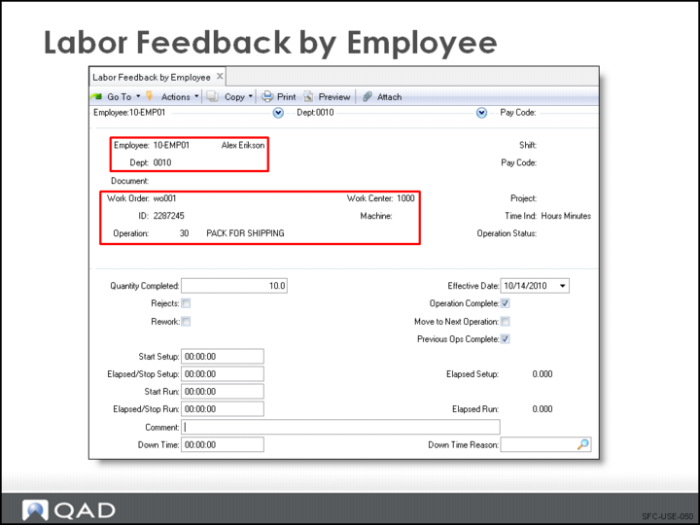
Use Labor Feedback by Work Order, by Employee, or by Work Center to enter actual labor. By default, this reports an operation as completed and moves the work order to the next operation on the routing. All three Labor Feedback screens contain the same information, only the order of the fields is different for data entry purposes.
Employee
At least one employee code is required. It is not necessary for this code to correspond to an actual person. You can set up a single employee code and use it only for reporting purposes.
Department
The work order routing determines the default department code. The system creates GL transactions using the accounts associated with the department code.
Work Center
The work order routing also determines the default work center code. The system uses the work center setup, run, and burden rates when it calculates costs and creates GL transactions.
Project
A project field is available for expense tracking by project.
Operation Complete, Move Next Operation, Previous Ops Complete
An operation is set to Complete status automatically during labor feedback transactions. This status change occurs when the work order quantity is finished at the current operation and the Move to Next Operation and Operation Complete fields are set to Yes. The defaults are Yes for Operation Complete, Move to Next Operation, and Previous Ops Complete. The Move to Next Operation default setting can be changed in Shop Floor Control.
Quantity Completed
The quantity completed is the number of good units produced. It is used in calculations for variances, work center efficiency, and GL transactions.
Rejects
The quantity rejected is the number of nonconforming units produced that cannot be moved to the next operation. It is not used for calculating variances, work center efficiency, or GL transactions.
If the quantity rejected is going to reduce the expected receipt quantity significantly, then use Work Order Maintenance to reduce the order quantity to the expected quantity. The enables MRP to review and plan for this shortfall. Burden is applied to all down-time hours entered here. This down time is not associated with the work order in QAD Enterprise Applications.
Rework
The quantity reworked is the number of unacceptable units requiring additional processing. It is not necessary that all of these result in good units that can be moved to the next operation. Like the quantity rejected, it is not used for calculating variances, work center efficiency, or GL transactions.
Start Setup, Elapsed/Stop Setup, Start Run, Elapsed/Stop Run
When entering labor time, enter either the start and stop times or the elapsed labor time. Report time in either decimal or in hour/mins. format. The format can be specified on each labor reporting transaction; however, a default is set up in Shop Floor Control.
Down Time
Non-productive labor can be entered with the reason code assigned to this down time. Down time is entered in elapsed time.