Defining Inventory Accounting Control Settings
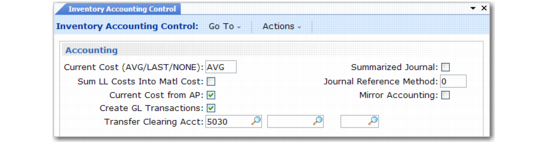
Use Inventory Accounting Control (36.9.2) to specify how current costs are maintained. For more information on setting up inventory control, see
QAD Master Data User Guide.
This section highlights the issues related to costing.
Inventory Accounting Control (36.9.2)
Current Cost
Current material, labor, and burden costs are maintained as either Average, Last, or None. Because this setting is database wide, all current costs for any site in the database are maintained using the selected costing method.
Sum LL Costs Into Material Cost
Cost-of-goods sold amounts are usually maintained separately for each cost component—material, labor, burden, overhead, and subcontract. However, some companies consider the material cost for an end item to include all costs associated with purchasing or manufacturing components, as well as any direct material costs. To report all lower-level costs as material costs (as if all components were bought from outside suppliers), set this field to Yes.
Current Cost from AP
To update the current material cost when receiver matching is complete, set this field to Yes. When the invoice price differs from the purchase order price, the current material cost is adjusted.
Create GL Transactions
Indicate whether inventory activities create GL transactions. This field does not impact memo-item transactions.
Yes: All inventory issues, receipts, count adjustments, and transfers create GL transactions reflecting the change in inventory asset balances. In addition, any transactions that affect work-in-process inventory create GL transactions, including work order issues and receipts.
No: GL transactions are not created by any of these activities.
Companies using perpetual inventory accounting should set this field to Yes, taking advantage of the automatic journal transactions created by the system.
Companies using periodic inventory accounting normally set this to No. Entries are made manually.
Transfer Clearing Account
Specify the GL account code used to track transfers within the same company (entity). This field cannot be blank when multiple sites are defined. In a single-site environment, the Purchases account is used when this field is blank.
Mirror Accounting
If set to Yes, mirror accounts are used. Whenever an inventory transaction is processed, the system checks to see if mirror accounts are set up in Mirror Table Maintenance (3.20). If they are, the mirror GL transaction is created automatically. If set to No, mirror accounts are not used. Mirror accounting is used in some European countries.