QAD 2017 Enterprise Edition
>
User Guides
>
Costing
>
Product Costing Process
>
Moving Current Costs to the General Ledger
Moving Current Costs to the General Ledger
At least two cost sets are maintained for each item or item and site:
• The current cost set reflects today’s cost for an item.
• The GL cost set is used for all general ledger transactions and inventory valuation for an item.
Update the current cost set during cost rollups first, verify the changes, and then copy the updated costs to the GL cost set.
Moving current costs can have significant effects on the general ledger. All changes to GL costs create a GL cost adjustment, updating the value of inventory.
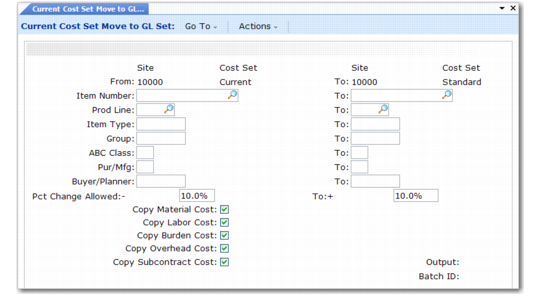
Use Current Cost Set Move to GL Set (1.4.22) to copy data between the current cost set and the GL cost set. You can move the costs of all items, individual items, or groups of items. Optionally, you can specify a range of percentage difference in cost for which copying is allowed. You can also inhibit copying of one or more cost set categories.
This function is most commonly used only at regular, widely spaced intervals. At the beginning of the year, many companies set current and GL costs equal.
Current Cost Set Move to GL Set (1.4.22)
Percent Change Allowed
Enter a percentage range of allowable cost differences between updated current costs and the previous GL costs. Only updated costs within this range are moved to the GL. To accept the movement of all costs, regardless of the difference from the previous GL costs, enter a question mark in this field and in the corresponding To field. To review cost changes without updating GL costs, enter zero in this field.
Copy Material Cost, Labor Cost, Burden Cost, Overhead Cost, and Subcontract Cost
Normally, set all fields to Yes. Each cost category is copied from the current cost set to the GL cost set, provided that the difference between the two total costs does not exceed the range specified in Percent Change Allowed.