QAD 2017 Enterprise Edition
>
User Guides
>
Costing
>
Cost Management
>
Cost Linking
Cost Linking
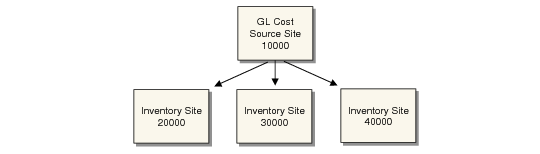
Linked-site costing functions let you specify default cost source sites for items held at multiple sites in one database. An inventory site is any site where items are held in inventory. Linking an inventory site to a primary costing site eliminates the need to set up duplicate GL cost records at all sites. This functionality only affects the active GL cost set. Current, simulated, and inactive GL cost sets are not affected.
Inventory Sites Linked to a Cost Source Site
Linked-site costing is especially useful when items are held in inventory or manufactured at one primary site, but are also held or manufactured at secondary sites. You can also assign different primary sites for different product lines, item types, or Purchase/Manufacture code designations.
Updating the active GL costs at a cost source site triggers a cost adjustment (CST-ADJ) transaction for the item at any other inventory site linked to the cost source site.
Updating the active GL costs at a target site has no effect on the cost source site. No CST-ADJ transactions are created at a cost source site if a target site’s GL cost set is updated.
Note: You cannot use linked-site costing for a site if you use the average cost method for GL transactions, since the average cost calculation does not consider inventory at multiple sites.
An inventory site can be a cost source site or a target site, but not both for the same item. If an inventory site has been used as a cost source site for an item, it must remain a cost source as long as there are links to it from target sites. Conversely, an inventory site for an item cannot be a cost source site as long as it is a target site.