QAD 2017 Enterprise Edition
>
User Guides
>
Costing
>
Cost Management
>
Multi-Element Costing
Multi-Element Costing
Costs for an item are always separated into five categories—material, labor, burden, overhead, and subcontract. An unlimited number of cost elements can be created as subsets of these categories. Item costs can then be assigned to these cost elements. See
Cost Set Categories.
The use of cost elements is optional. You only need to introduce cost elements when you want additional reporting detail. For example, a company may want to split material cost into foreign and domestic content. Another company might want to split material costs for purchased items into purchase price and freight.
If you are using the Logistics Accounting module, you need to set up separate cost elements used for inbound logistics charge accruals. The cost elements must be in the Material or Overhead cost categories.
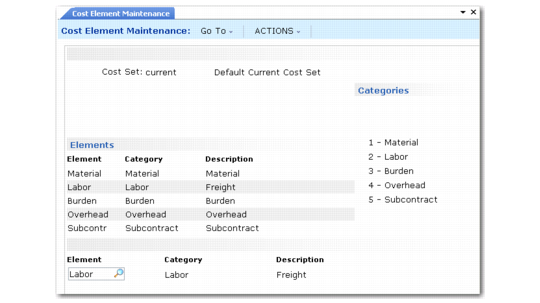
Create new cost elements for GL and current cost sets using Cost Element Maintenance (30.17.1).
Cost Element Maintenance (30.17.1)
Every cost set starts out with five cost elements that match the cost categories. You can add others but you cannot delete these. Each of the cost elements you add must be associated with one of the five cost categories.
You can set up current and GL cost set with the same cost elements or each cost set can have its own set of cost elements, or each cost set can be set up the same. To use the same elements for all cost sets, enter the cost elements for one cost set, and then use Cost Element Copy (30.17.4) to copy them to the other cost sets. Additional elements can be added to these cost sets.