Creating Document Definitions
You can create exchange file, application, and implementation document definitions by loading them from trading partner library files, entering them manually, or copying them from an existing definition of the same type.
An additional menu program—Create eCommerce Doc Definitions (35.15.4)—offers more ways to create these document definitions. You can create a definition from:
• A different type of document definition
• A temp-table definition in Progress syntax from either Progress source code (.p or .i file) or a .txt file
• An XML document (.xml file)
• An XSD document (.xsd file)
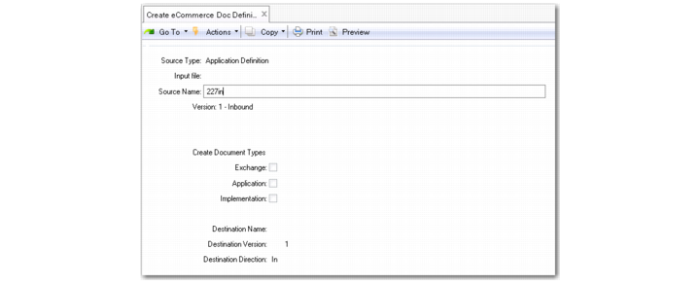
Create eCommerce Document Definition (35.15.4)
Source Type
Select the type of source you want to use for the new document definition. Valid values are:
Exchange File Definition
Application Definition
Implementation Definition
Temp Table Definition (*.i, *.p, *.txt)
XML Document (*.xml)
XSD Document (*.xsd)
Input File
Enter the name of the file that contains the source file for the new definition. You can only access this field when the source type is a temp table, .xml document, or .xsd document. Leave blank to display a navigation screen for selecting files.
Source Name
Select the source document that the new document is copied from. You can only access this field when the source type is an exchange file, application, or implementation definition. Use the arrow keys to scroll through available documents of the selected source type. The system displays information about each document.
Create Document Type
Select one or more document types to create. You must select at least one type.
Destination Name, Version, Direction
Specify a name, version, and direction (inbound, outbound) for the new document definitions.
Special Considerations for Creating Definitions from Files
Creating a document definition based on an existing exchange, application, or implementation definition does not have any particular limitations. However, some special considerations apply when you create a definition from temp tables or .xml/.xsd files.
Fields Defined in Temp Tables
When you use temp table definitions as the source, all fields required for the definition must be included within the “define” statement itself. Additional fields defined in a referenced include file are not part of the resulting document definition.
Example: The following temp table definition would create the record tt_doc_status with only the fields tt_doc_seq and tt_gtwy_pgm. Any fields defined in ednrmfdf.i would not be part of the new document definition.
define temp-table tt_doc_status no-undo
field tt_doc_seq like edmfs_mfd_seq
field tt_gtwy_pgm like edmf_gtwy_pgm
{ednrmfdf.i}
index tt_gtwy_idx tt_doc_seq.
Record Fields
• Maximum number of fields. Creating a definition from a file limits the maximum number of fields that can be created for each record:
• For Enterprise Edition: 300
• For Standard Edition: 100
If the number of fields in the file exceeds the limit, the system ignores additional fields when creating the definition.
• Data type. When creating a definition from an XML file, the system sets the data type for each field to AN (alphanumeric). For XSD or temp table definition files, the field is assigned the data type defined in the file, unless the syntax defines the field as “like” another field. In that case, the system uses AN as the data type.
• Order. The system creates fields for nodes in an XML file that do not have a value. However, the order in which the fields are created is not necessarily the same as the order in which they appear in the XML document.
Record Loop End Sequence
When creating a definition from an XSD file or a temp-table definition that contains data relationship information, the system attempts to determine the loop ending sequence number for a record. In cases where it cannot, it sets the end sequence to 0 (zero).
For definitions created from XML documents, the loop end sequence number is always set to 0.