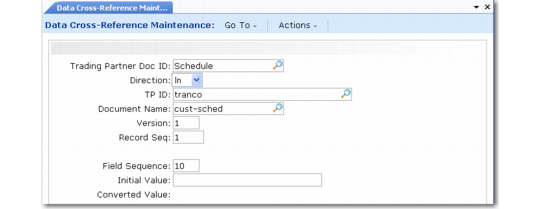
Defining Data Cross-References
Use Data Cross-Reference Maintenance (35.13.16) to set up automatic conversions from one specified value to another in inbound or outbound documents during the transformation process. You can do this setup on various broad and specific levels. For example, you can apply the conversion to all documents from a certain trading partner or only to a document from that trading partner that uses a specific document type.
Example: You can use this function to perform unit-of-measure conversions between an incoming trading partner document and the target business document in your system.
Use Data Cross-Reference Browse (35.13.17) or Data Cross-Reference Report (35.13.18) to view existing cross-references.
Data Cross-Reference Maintenance (35.13.16)
Trading Partner Doc ID
Enter the trading partner document to which this conversion applies.
Direction
Enter the direction of the documents to which this conversion applies. Documents imported into your system are inbound, while documents exported to the EC subsystem are outbound.
Trading Partner ID
Enter a valid ID code of a trading partner defined in Trading Partner Maintenance (35.13.7). This conversion applies only to documents involving this trading partner.
Document Name and Version
Enter the document definition and version to which this conversion applies.
Record Seq
Enter the sequence number of the record that is modified during the conversion.
Field Seq
Enter the sequence number of the field that is modified during the conversion.
Initial Value
Enter the target value that is converted, indicating how the field reads before conversion.
Converted Value
Enter the new value, indicating how the field will read after conversion.