Using Transformation Functions
A transformation function is a Progress procedure that performs a predefined action during the transformation process. For example, a function can add two values or retrieve the current system date.
Using QAD-Provided Functions
eCommerce includes a number of functions that can be used for transforming data between an EC subsystem and your system. They are specified as part of the transformation definition.
Creating User-Defined Functions
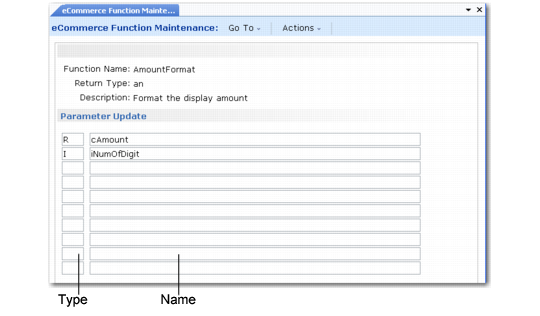
Use eCommerce Function Maintenance (35.15.21) to create additional functions, if needed.
Define the type of return required—alphanumeric, integer, real number, date, or logical—as well as the names and types of the parameters that the function passes. The program uses your input to create a Progress program template. After saving the template to disk, use a text editor to open the file and complete the code.
The system saves user-defined functions in the directory specified in eCommerce Control with the file name FunctionName.p.
eCommerce Function Maintenance (35.15.21)
Function Name
Enter a unique alphanumeric name for this function. Do not use the name of any existing QAD-provided or user-defined function.
Important: The file name is based on the function name you specify. Use function names that follow the naming conventions of your operating system.
Description
Optionally describe what this function does.
Return Type
Enter the type of value returned as output when this function is performed. Valid settings are:
• AN: Alphanumeric
• R: Real number
• I: Integer
• L: Logical
• D: Date
Type
Enter the type of value that this variable represents. Valid settings are the same as for Return Type.
Name
Enter the name of the variable that is created inside the program.
Important: Do not use Progress keywords or special characters as the variable name. Doing so causes the function to fail.
Viewing Existing Transformation Functions
Two programs display information about existing transformation functions.
• Use eCommerce Function Inquiry (35.15.22) to scroll through summary information on functions.
• Use eCommerce Function Report (35.15.23) to generate a complete report on a selected range of functions.
Copying Transformation Functions
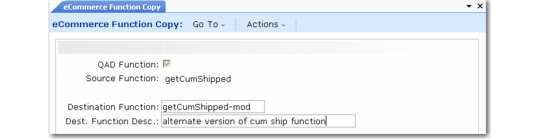
Use eCommerce Function Copy (35.17.2) to copy an existing transformation function—either QAD-provided or user-defined—to a new function name. Then, use eCommerce Function Maintenance to modify the copy as needed.
The new definition is created in the function directory specified in eCommerce Control.
Use this method to streamline creation of similar definitions.
You can also use this program to delete existing user-defined functions. Move the cursor to the Source Function field in the applicable record and choose Delete. Enter Yes at the delete confirmation prompt.
Note: You cannot delete QAD-supplied functions.
eCommerce Function Copy (35.17.2)
QAD Function
Enter Yes to specify that the function to copy is one provided as part of eCommerce. If No, the function is user-defined.
Source Function
Enter the name of the existing function to copy or delete. Use the arrow keys to scroll through the list of available functions, determined by the setting in QAD Function.
Destination Function
Enter a name for the new function. The system saves the new file in the function directory specified in eCommerce Control with the file name:
DestinationFunction.p
Important: The file name is based on the function name you specify. Use function names that follow the naming conventions of your operating system.
Dest. Function Desc
Optionally enter a description for the new function.