Renumbering Transformation Actions
Define the transformation process that converts data between EDI formats and business document formats using Transformation Definition Maint (35.15.17). The Action Seq field establishes the sequence in which the transformation events take place. You cannot edit an event record—including its sequence—after it has been created. The only way to modify an event is to delete it and reenter the modified version.
To insert an event between two existing events when no intermediate sequence number is available, use Transformation Renumber Utility (35.17.3). That program lets you reset all the action sequences in the transformation definition to a higher value.
Example: A transformation definition was set up in sequence increments of 5; that is, the first step was numbered 5, the second 10, and so on. In subsequent changes to the definition, you have added event sequences 6, 7, 8, and 9. It is now necessary to add another event between sequences 7 and 8. To avoid deleting and reentering events 8, 9, and 10 to assign them higher sequence numbers, use Transformation Renumber Utility to increase the gaps between all the sequences in the definition.
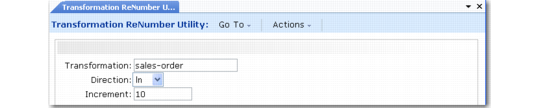
Transformation Renumber Utility (35.17.3)
Transformation
Enter the name of the transformation definition with action sequences that you want to reset to different values.
Direction
Specify the direction—inbound or outbound—of the documents that are transformed using this definition.
Important: Make sure to select the appropriate direction. Two transformation definitions can have the same name and be distinguished only by direction.
Increment
Enter the incremental factor the system uses in renumbering the event action sequences. The increment is also the number assigned to the first event. For example, if you enter 5, the system numbers the first event 5 and subsequent events 10, 15, 20, and so on.