Deleting Trading Partner Setup Data
Use Trading Partner Document Delete (35.17.10) to clean up your database by deleting trading partner document definitions that are no longer needed.
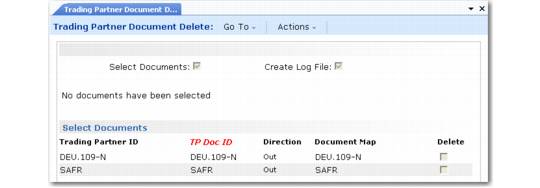
Trading Partner Document Delete (35.17.10)
When Select Documents is Yes, the system displays all available trading partner documents, as defined in Trading Partner Maintenance. By default, the Delete column is No. Use the space bar to toggle it to Yes for documents you want to delete.
When you click Next and confirm the selection, the system deletes the following records:
• The trading partner document
• The corresponding record in Trading Partner Parameter Maint, if the site/address combination is not used elsewhere in EDI eCommerce
• The transformation, implementation, exchange, and application document definitions, if they are not used for other documents in the system
• The Trading Partner Maintenance record, if all the documents have been deleted from it
When Create Log File is Yes, the system summarizes the records that were deleted in the process log directory specified in eCommerce Control. If that field is blank, the file is created in the user startup directory. The file naming convention is tpdocdelete_MM-DD-YYYY_HHMMSS.log.