GL Account Restriction Maintain
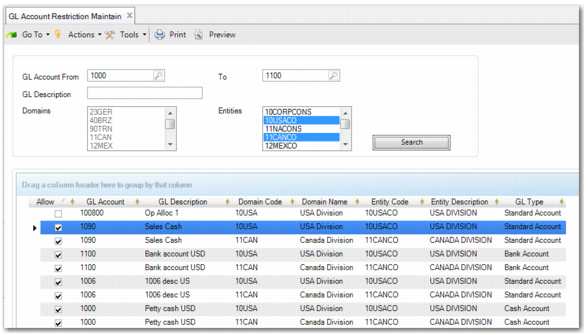
GL Account Restriction Maintain (25.3.26.1) enables you to restrict GL accounts to certain entities by allowing or disallowing them in the grid. To populate the grid, use the search criteria in the top pane.
GL Account Restriction Maintain
GL Account From/To
Enter a GL range. If you leave a field blank, a very large number of GL accounts may be loaded.
GL Description
Enter the description of the GL account you are looking for.
Domains
The domain list displays all domains with the same GL shared set as the current domain. Select a domain to search for GL accounts. Use the Ctrl key to select multiple domains. When you select a domain, the Entities list is disabled.
Entities
The entity list displays all entities with the same GL shared set as the current entity. Select an entity to search for GL accounts. Use the Ctrl key to select multiple entities. When you select an entity, the Domains list is disabled.
When you click Search, the relevant GL accounts are displayed in the grid. The columns are mostly read only.
Allow
By default, this field is selected for every GL account. When the account type is Standard, Bank, Cash, Open Item, PO Receipts, Supplier Payment Account, or Customer Payment Account; you can disallow the account by clearing the Allow field. For other account types, this field is read only.
GL Account/Domain Code/Domain Name/Entity Code/Entity Description
These fields display important details about the GL account. They are read only.
Comment
This field enables you to enter a comment explaining why you are disallowing this account for the entity. The comment is only displayed when the account is disallowed. This field is hidden by default.
Last Modified User/Date
This field displays the user who disallowed the account and the date when it was disallowed. This information is only displayed when the account is disallowed. These fields are hidden by default.
GL Type/GL System Type
These fields are read only and are hidden by default.
When you click Save, any changes that you have made take effect in the system. GL Account Restriction View (25.3.26.2) enables you to view the restrictions that apply to any GL account in the system. You can search by GL account, GL type, GL description, domain, entity, or by whether the account is allowed.