Archive Configuration Maintenance
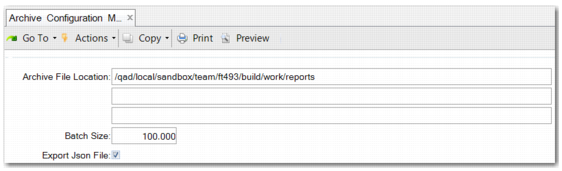
Archive Configuration Maintenance (36.23.4.2) lets you define general journal entry archive settings for the whole database. You can specify a general archive file location, a batch size, and whether to also create JSON archive files.
Archive Configuration
Archive File Location
Specify the default file location for financial archive files. You can update this file path in Archive Task Maintenance (36.23.4.3).
Batch Size
Enter a batch size. The system uses this batch size to create archive files and to summarize journal entries to improve performance and avoid time-out issues. The batch size determines the number of postings that are processed in a single technical transaction.
Note: Two other batch sizes are defined in ArchiveConfig.xml. One batch size is for Financial Archive File Reload. The default batch size for archive file reload is set to 20,000. If you have a powerful server, file reload may be faster when you increase the file reload batch size. You can manually update the batch size in the XML file.
The other batch size is for JSON archive file generation, which is set to 40,000 by default. You can increase the JSON archive file batch size in ArchiveConfig.xml when the following tables contain little or no data:
• Posting
• PostingLine
• PostingSaf
• PostingVat
• PostingVatDelay
• PostingWHT
Where you have a large data volume to archive in one GL period, the system may create multiple JSON archive files. One JSON file should not be more than two GB due to the Windows JSON file size limitation.
Export Json File
The standard output file format of archiving is a special CSV type file, comparable to Progress .d files. Select this field to additionally archive in JSON format. JSON is an industry standard that allows reporting with external tools.